

Code Samples
Toy Store App
This app showcases how you might build a robust production system with Soklet.
It lives in its own GitHub repository.
Feature highlights include:
- Authentication (PBKDF2 password hashing, Ed25519-signed access tokens) and role-based authorization
- Basic CRUD operations
- Dependency injection via Google Guice
- Relational database integration via Pyranid
- Context-awareness via ScopedValue (JEP 506)
- Internationalization via Lokalized and the JDK
- JSON requests/responses via Gson
- HTTP response streaming for large or incremental exports
- Server-Sent Events (SSE) and Model Context Protocol (MCP)
- Logging via SLF4J / Logback
- Metrics via Soklet's
MetricsCollector - Automated unit and integration tests via JUnit
- Ability to run in Docker
The app also includes a web frontend which makes it easy to kick the tires:
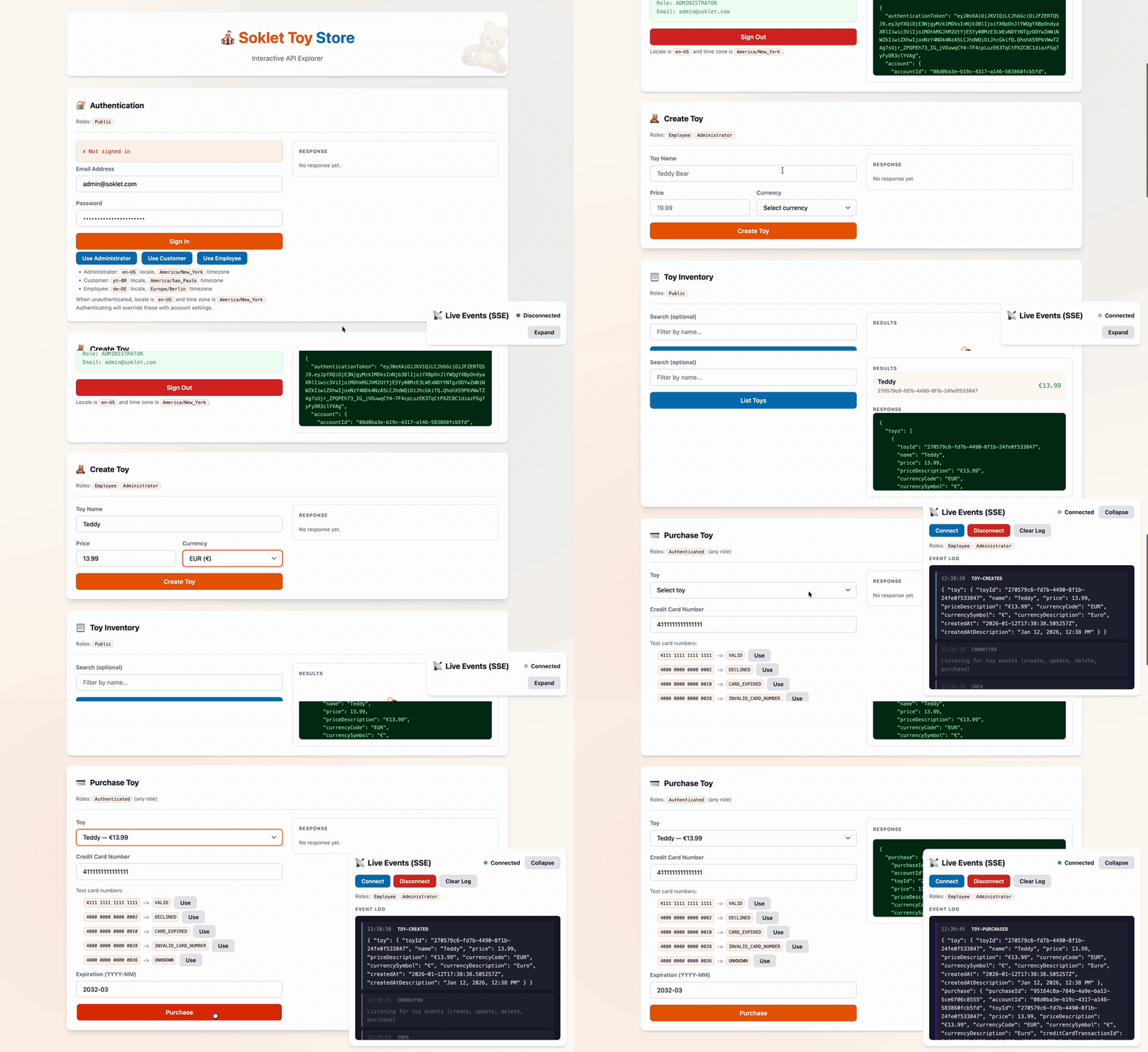
If you'd like fewer moving parts, a single-file "barebones" example is available.
Build and Run
First, clone the Git repository and set your working directory.
% git clone git@github.com:soklet/toystore-app.git
% cd toystore-app
% git clone git@github.com:soklet/toystore-app.git
% cd toystore-app
With Docker
This is the easiest way to run the Toy Store App. You don't need anything on your machine other than Docker. The app will run in its own sandboxed Java 25 Docker Container.
The Dockerfile is viewable here if you are curious about how it works.
You likely will want to have your app run inside of a Docker Container using this approach in a real deployment environment.
Build
% docker build . --file docker/Dockerfile --tag soklet/toystore
% docker build . --file docker/Dockerfile --tag soklet/toystore
Run
# Press Ctrl+C to stop the interactive container session
% docker run -e TOYSTORE_ENVIRONMENT="local" -p 8080:8080 -p 8081:8081 -p 8082:8082 soklet/toystore
# Press Ctrl+C to stop the interactive container session
% docker run -e TOYSTORE_ENVIRONMENT="local" -p 8080:8080 -p 8081:8081 -p 8082:8082 soklet/toystore
This starts the regular HTTP API on port 8080, the SSE server on 8081, and the MCP server on 8082.
Test
% curl -i 'http://localhost:8080/health-check'
HTTP/1.1 200 OK
Content-Length: 2
Content-Type: text/plain;charset=UTF-8
Date: Sun, 21 Mar 2024 16:19:01 GMT

OK
% curl -i 'http://localhost:8080/health-check'
HTTP/1.1 200 OK
Content-Length: 2
Content-Type: text/plain;charset=UTF-8
Date: Sun, 21 Mar 2024 16:19:01 GMT

OK
You can also inspect Prometheus-formatted metrics from the /metrics endpoint:
% curl -s 'http://localhost:8080/metrics' | head -n 3
# HELP soklet_http_requests_active Currently active HTTP requests
# TYPE soklet_http_requests_active gauge
soklet_http_requests_active 0
% curl -s 'http://localhost:8080/metrics' | head -n 3
# HELP soklet_http_requests_active Currently active HTTP requests
# TYPE soklet_http_requests_active gauge
soklet_http_requests_active 0
Open http://localhost:8080/ in a browser to use the interactive API explorer.
Without Docker
The Toy Store App requires Apache Maven (you can skip Maven if you prefer to run directly through your IDE) and JDK 25+. If you need a JDK, Amazon Corretto is a free-to-use-commercially, production-ready distribution of OpenJDK that includes long-term support.
Build
% mvn compile
% mvn compile
Run
% TOYSTORE_ENVIRONMENT="local" MAVEN_OPTS="--sun-misc-unsafe-memory-access=allow --enable-native-access=ALL-UNNAMED --add-opens java.base/java.time=ALL-UNNAMED --add-opens java.base/java.util=ALL-UNNAMED --add-opens java.base/java.lang=ALL-UNNAMED" mvn -e exec:java -Dexec.mainClass="com.soklet.toystore.App"
% TOYSTORE_ENVIRONMENT="local" MAVEN_OPTS="--sun-misc-unsafe-memory-access=allow --enable-native-access=ALL-UNNAMED --add-opens java.base/java.time=ALL-UNNAMED --add-opens java.base/java.util=ALL-UNNAMED --add-opens java.base/java.lang=ALL-UNNAMED" mvn -e exec:java -Dexec.mainClass="com.soklet.toystore.App"
API Demonstration
Here we demonstrate how a client might interact with the Toy Store App. Implementation details are available in the API Modeling section of this document.
Authenticate
Given an email address and password, return account information and an authentication token (a signed JWT).
We specify Accept-Language and Time-Zone headers so the server knows how to provide "friendly" localized descriptions in the unauthenticated response.
 % curl -i -X POST 'http://localhost:8080/accounts/authenticate' \
   -d '{"emailAddress": "admin@soklet.com", "password": "administrator-password"}' \
   -H "Accept-Language: en-US" \
   -H "Time-Zone: America/New_York"
HTTP/1.1 200 OK
Content-Length: 640
Content-Type: application/json;charset=UTF-8
Date: Sun, 21 Mar 2024 16:19:01 GMT

{
  "authenticationToken": "eyJhbG...c76fxc",
  "account": {
    "accountId": "08d0ba3e-b19c-4317-a146-583860fcb5fd",
    "roleId": "ADMINISTRATOR",
    "name": "Example Administrator",
    "emailAddress": "admin@soklet.com",
    "timeZone": "America/New_York",
    "timeZoneDescription": "Eastern Time",
    "locale": "en-US",
    "localeDescription": "English (United States)",
    "createdAt": "2024-06-09T13:25:27.038870Z",
    "createdAtDescription": "Jun 9, 2024, 9:25 AM"
  }
}
 % curl -i -X POST 'http://localhost:8080/accounts/authenticate' \
   -d '{"emailAddress": "admin@soklet.com", "password": "administrator-password"}' \
   -H "Accept-Language: en-US" \
   -H "Time-Zone: America/New_York"
HTTP/1.1 200 OK
Content-Length: 640
Content-Type: application/json;charset=UTF-8
Date: Sun, 21 Mar 2024 16:19:01 GMT

{
  "authenticationToken": "eyJhbG...c76fxc",
  "account": {
    "accountId": "08d0ba3e-b19c-4317-a146-583860fcb5fd",
    "roleId": "ADMINISTRATOR",
    "name": "Example Administrator",
    "emailAddress": "admin@soklet.com",
    "timeZone": "America/New_York",
    "timeZoneDescription": "Eastern Time",
    "locale": "en-US",
    "localeDescription": "English (United States)",
    "createdAt": "2024-06-09T13:25:27.038870Z",
    "createdAtDescription": "Jun 9, 2024, 9:25 AM"
  }
}
Create Toy
Now that we have an authentication token, add a toy to our database.
Because the server knows which account is making the request, the data in the response is formatted according to the account's preferred locale and timezone (here, en-US and America/New_York).
# Note: price is a string instead of a JSON number (float)
# to support exact arbitrary-precision decimals
% curl -i -X POST 'http://localhost:8080/toys' \
  -d '{"name": "Test", "price": "1234.5", "currency": "GBP"}' \
  -H "Authorization: Bearer eyJhbG...c76fxc"
HTTP/1.1 200 OK
Content-Length: 351
Content-Type: application/json;charset=UTF-8
Date: Sun, 21 Mar 2024 16:19:01 GMT

{
  "toy": {
    "toyId": "9bd5ea4d-ebd1-47f7-a8b4-0531b8655e5d",
    "name": "Test",
    "price": 1234.50,
    "priceDescription": "£1,234.50",
    "currencyCode": "GBP",
    "currencySymbol": "£",
    "currencyDescription": "British Pound",
    "createdAt": "2024-06-09T13:44:26.388364Z",
    "createdAtDescription": "Jun 9, 2024, 9:44 AM"
  }
}
# Note: price is a string instead of a JSON number (float)
# to support exact arbitrary-precision decimals
% curl -i -X POST 'http://localhost:8080/toys' \
  -d '{"name": "Test", "price": "1234.5", "currency": "GBP"}' \
  -H "Authorization: Bearer eyJhbG...c76fxc"
HTTP/1.1 200 OK
Content-Length: 351
Content-Type: application/json;charset=UTF-8
Date: Sun, 21 Mar 2024 16:19:01 GMT

{
  "toy": {
    "toyId": "9bd5ea4d-ebd1-47f7-a8b4-0531b8655e5d",
    "name": "Test",
    "price": 1234.50,
    "priceDescription": "£1,234.50",
    "currencyCode": "GBP",
    "currencySymbol": "£",
    "currencyDescription": "British Pound",
    "createdAt": "2024-06-09T13:44:26.388364Z",
    "createdAtDescription": "Jun 9, 2024, 9:44 AM"
  }
}
Purchase Toy
Let's purchase the toy that was just added.
 % curl -i -X POST 'http://localhost:8080/toys/9bd5ea4d-ebd1-47f7-a8b4-0531b8655e5d/purchase' \
  -d '{"creditCardNumber": "4111111111111111", "creditCardExpiration": "2028-03"}' \
  -H "Authorization: Bearer eyJhbG...c76fxc"
HTTP/1.1 200 OK
Content-Length: 523
Content-Type: application/json;charset=UTF-8
Date: Sun, 21 Mar 2024 16:19:01 GMT

{
  "purchase": {
    "purchaseId": "6e92a09b-1706-4d79-87a0-7f34c1cc5f5c",
    "accountId": "08d0ba3e-b19c-4317-a146-583860fcb5fd",
    "toyId": "9bd5ea4d-ebd1-47f7-a8b4-0531b8655e5d",
    "price": 1234.50,
    "priceDescription": "£1,234.50",
    "currencyCode": "GBP",
    "currencySymbol": "£",
    "currencyDescription": "British Pound",
    "creditCardTransactionId": "72534075-d572-49fd-ae48-6c9644136e70",
    "createdAt": "2024-06-09T14:12:08.100101Z",
    "createdAtDescription": "Jun 9, 2024, 10:12 AM"
  }
}
 % curl -i -X POST 'http://localhost:8080/toys/9bd5ea4d-ebd1-47f7-a8b4-0531b8655e5d/purchase' \
  -d '{"creditCardNumber": "4111111111111111", "creditCardExpiration": "2028-03"}' \
  -H "Authorization: Bearer eyJhbG...c76fxc"
HTTP/1.1 200 OK
Content-Length: 523
Content-Type: application/json;charset=UTF-8
Date: Sun, 21 Mar 2024 16:19:01 GMT

{
  "purchase": {
    "purchaseId": "6e92a09b-1706-4d79-87a0-7f34c1cc5f5c",
    "accountId": "08d0ba3e-b19c-4317-a146-583860fcb5fd",
    "toyId": "9bd5ea4d-ebd1-47f7-a8b4-0531b8655e5d",
    "price": 1234.50,
    "priceDescription": "£1,234.50",
    "currencyCode": "GBP",
    "currencySymbol": "£",
    "currencyDescription": "British Pound",
    "creditCardTransactionId": "72534075-d572-49fd-ae48-6c9644136e70",
    "createdAt": "2024-06-09T14:12:08.100101Z",
    "createdAtDescription": "Jun 9, 2024, 10:12 AM"
  }
}
Internationalization (i18n)
Unauthenticated requests use Accept-Language and Time-Zone headers; authenticated requests use the account's locale and time zone. The example below assumes the account is configured for pt-BR (Brazilian Portuguese) and America/Sao_Paulo (São Paulo time, UTC-03:00).
% curl -i -X POST 'http://localhost:8080/toys' \
  -d '{"name": "Bola de futebol", "price": "50", "currency": "BRL"}' \
  -H "Authorization: Bearer eyJhbG...c76fxc"
HTTP/1.1 200 OK
Content-Length: 362
Content-Type: application/json;charset=UTF-8
Date: Sun, 21 Mar 2024 16:19:01 GMT

{
  "toy": {
    "toyId": "3c7c179a-a824-4026-b00c-811710192ff2",
    "name": "Bola de futebol",
    "price": 50.00,
    "priceDescription": "R$ 50,00",
    "currencyCode": "BRL",
    "currencySymbol": "R$",
    "currencyDescription": "Real brasileiro",
    "createdAt": "2024-06-09T14:03:49.748571Z",
    "createdAtDescription": "9 de jun. de 2024 11:03"
  }
}
% curl -i -X POST 'http://localhost:8080/toys' \
  -d '{"name": "Bola de futebol", "price": "50", "currency": "BRL"}' \
  -H "Authorization: Bearer eyJhbG...c76fxc"
HTTP/1.1 200 OK
Content-Length: 362
Content-Type: application/json;charset=UTF-8
Date: Sun, 21 Mar 2024 16:19:01 GMT

{
  "toy": {
    "toyId": "3c7c179a-a824-4026-b00c-811710192ff2",
    "name": "Bola de futebol",
    "price": 50.00,
    "priceDescription": "R$ 50,00",
    "currencyCode": "BRL",
    "currencySymbol": "R$",
    "currencyDescription": "Real brasileiro",
    "createdAt": "2024-06-09T14:03:49.748571Z",
    "createdAtDescription": "9 de jun. de 2024 11:03"
  }
}
Error messages are localized as well. Here we supply a negative price and forget to specify a currency.
% curl -i -X POST 'http://localhost:8080/toys' \
  -d '{"name": "Bola de futebol", "price": "-50"}' \
  -H "Authorization: Bearer eyJhbG...c76fxc"
HTTP/1.1 422 Unprocessable Content
Content-Length: 261
Content-Type: application/json;charset=UTF-8
Date: Sun, 21 Mar 2024 16:19:01 GMT

{
  "summary": "O preço não pode ser negativo. A moeda é obrigatória.",
  "generalErrors": [],
  "fieldErrors": {
    "price": [
      "O preço não pode ser negativo."
    ],
    "currency": [
      "A moeda é obrigatória."
    ]
  },
  "metadata": {}
}
% curl -i -X POST 'http://localhost:8080/toys' \
  -d '{"name": "Bola de futebol", "price": "-50"}' \
  -H "Authorization: Bearer eyJhbG...c76fxc"
HTTP/1.1 422 Unprocessable Content
Content-Length: 261
Content-Type: application/json;charset=UTF-8
Date: Sun, 21 Mar 2024 16:19:01 GMT

{
  "summary": "O preço não pode ser negativo. A moeda é obrigatória.",
  "generalErrors": [],
  "fieldErrors": {
    "price": [
      "O preço não pode ser negativo."
    ],
    "currency": [
      "A moeda é obrigatória."
    ]
  },
  "metadata": {}
}
Model Context Protocol (MCP)
The Toy Store App also exposes a read-only MCP endpoint at http://localhost:8082/mcp. It uses short-lived MCP-specific access tokens minted by the regular HTTP API.
First, mint an MCP token from the authenticated HTTP session:
% curl -i -X POST 'http://localhost:8080/accounts/mcp-access-token' \
  -H "Authorization: Bearer eyJhbG...c76fxc"
HTTP/1.1 200 OK
Content-Type: application/json;charset=UTF-8

{
  "accessToken": "eyJ...mcp"
}
% curl -i -X POST 'http://localhost:8080/accounts/mcp-access-token' \
  -H "Authorization: Bearer eyJhbG...c76fxc"
HTTP/1.1 200 OK
Content-Type: application/json;charset=UTF-8

{
  "accessToken": "eyJ...mcp"
}
Next, initialize an MCP session on port 8082:
% curl -i -X POST 'http://localhost:8082/mcp' \
  -H "Authorization: Bearer eyJ...mcp" \
  -H "Content-Type: application/json" \
  -d '{
    "jsonrpc":"2.0",
    "id":"req-1",
    "method":"initialize",
    "params":{
      "protocolVersion":"2025-11-25",
      "capabilities":{},
      "clientInfo":{"name":"curl","version":"1.0.0"}
    }
  }'
% curl -i -X POST 'http://localhost:8082/mcp' \
  -H "Authorization: Bearer eyJ...mcp" \
  -H "Content-Type: application/json" \
  -d '{
    "jsonrpc":"2.0",
    "id":"req-1",
    "method":"initialize",
    "params":{
      "protocolVersion":"2025-11-25",
      "capabilities":{},
      "clientInfo":{"name":"curl","version":"1.0.0"}
    }
  }'
Copy the MCP-Session-Id response header, then finish initialization and call a tool:
% curl -X POST 'http://localhost:8082/mcp' \
  -H "Content-Type: application/json" \
  -H "MCP-Session-Id: s_abc123" \
  -H "MCP-Protocol-Version: 2025-11-25" \
  -d '{"jsonrpc":"2.0","method":"notifications/initialized","params":{}}'

% curl -X POST 'http://localhost:8082/mcp' \
  -H "Content-Type: application/json" \
  -H "MCP-Session-Id: s_abc123" \
  -H "MCP-Protocol-Version: 2025-11-25" \
  -d '{
    "jsonrpc":"2.0",
    "id":"req-2",
    "method":"tools/call",
    "params":{
      "name":"list_toys",
      "arguments":{}
    }
  }'
% curl -X POST 'http://localhost:8082/mcp' \
  -H "Content-Type: application/json" \
  -H "MCP-Session-Id: s_abc123" \
  -H "MCP-Protocol-Version: 2025-11-25" \
  -d '{"jsonrpc":"2.0","method":"notifications/initialized","params":{}}'

% curl -X POST 'http://localhost:8082/mcp' \
  -H "Content-Type: application/json" \
  -H "MCP-Session-Id: s_abc123" \
  -H "MCP-Protocol-Version: 2025-11-25" \
  -d '{
    "jsonrpc":"2.0",
    "id":"req-2",
    "method":"tools/call",
    "params":{
      "name":"list_toys",
      "arguments":{}
    }
  }'
The initial MCP surface is intentionally read-only:
list_toysget_toyresources/listresources/readfortoystore://toys/{toyId}
For transport details beyond the Toy Store example, see the general MCP documentation.
Context-Awareness
Your code should always know its context with respect to the current thread of execution.
Examples of contextual information include:
- Where am I running? (e.g. web request, background thread)
- Who is the authenticated user, if any?
- How am I internationalized? (e.g. time zone, language, country)
A good implementation should be threadsafe and not require a "context" object to be passed all the way down the call stack. Java supports this via ScopedValue<T> and ThreadLocal<T>.
The Toy Store App defines its own CurrentContext type to provide a uniform interface for working with contextual data.
We can wrap processing for each request with this context...
SokletConfig config = SokletConfig.withHttpServer(...)
  .requestInterceptor(new RequestInterceptor() {
    @Override
    public void wrapRequest(
      @NonNull ServerType serverType,
      @NonNull Request request,
      @NonNull Consumer<Request> requestProcessor
    ) {
      // Ensure a "current context" exists for all request-handling code.
      // Use request headers to determine the best locale/time zone before auth.
      Localization localization = resolveLocalization(request);

      CurrentContext.withRequest(request)
        .locale(localization.locale())
        .timeZone(localization.timeZone())
        .build()
        .run(() -> {
          requestProcessor.accept(request);
        });
    })
  .build();
SokletConfig config = SokletConfig.withHttpServer(...)
  .requestInterceptor(new RequestInterceptor() {
    @Override
    public void wrapRequest(
      @NonNull ServerType serverType,
      @NonNull Request request,
      @NonNull Consumer<Request> requestProcessor
    ) {
      // Ensure a "current context" exists for all request-handling code.
      // Use request headers to determine the best locale/time zone before auth.
      Localization localization = resolveLocalization(request);

      CurrentContext.withRequest(request)
        .locale(localization.locale())
        .timeZone(localization.timeZone())
        .build()
        .run(() -> {
          requestProcessor.accept(request);
        });
    })
  .build();
...and it becomes accessible to all of our code downstream:
// Some business logic that needs the current context's timezone
ZoneId timeZone = currentContextProvider.get().getTimeZone();

if (creditCardExpiration.isBefore(YearMonth.now(timeZone)))
  errorCollector.addFieldError(
    "creditCardExpiration",
    // Our Strings instance here also pulls localized values
    // by picking the best translation file for the current context's locale
    getStrings().get("Credit card is expired.")
  );
// Some business logic that needs the current context's timezone
ZoneId timeZone = currentContextProvider.get().getTimeZone();

if (creditCardExpiration.isBefore(YearMonth.now(timeZone)))
  errorCollector.addFieldError(
    "creditCardExpiration",
    // Our Strings instance here also pulls localized values
    // by picking the best translation file for the current context's locale
    getStrings().get("Credit card is expired.")
  );
You usually want to associate the authenticated account with a context:
Account authenticatedAccount = doSomeWorkToAuthenticate(...);

CurrentContext.withAccount(authenticatedAccount)
  .request(request)
  .build()
  .run(() -> {
    // Downstream code
    CurrentContext currentContext = currentContextProvider.get();
    // ... do something with the context
  });
Account authenticatedAccount = doSomeWorkToAuthenticate(...);

CurrentContext.withAccount(authenticatedAccount)
  .request(request)
  .build()
  .run(() -> {
    // Downstream code
    CurrentContext currentContext = currentContextProvider.get();
    // ... do something with the context
  });
You might also create a context that's not tied to a request or account. This is useful for scenarios like background threads and integration tests.
CurrentContext.with(Locale.US, ZoneId.of("America/New_York"))
  .build()
  .run(() -> {
    // Downstream code
    CurrentContext currentContext = currentContextProvider.get();
    // ... do something with the context
  });
CurrentContext.with(Locale.US, ZoneId.of("America/New_York"))
  .build()
  .run(() -> {
    // Downstream code
    CurrentContext currentContext = currentContextProvider.get();
    // ... do something with the context
  });
It should also be possible to nest contexts and/or permit context mutation.
For example, suppose at the start of request handling you set a current context with the request bound to it. Later on, you might authenticate an account and want to associate it with the context.
The CurrentContext implementation for the Toy Store App solves this by maintaining an internal ScopedValue<T>. This provides familiar stack-like semantics (push a context on the stack before execution starts, it gets popped after execution finishes).
// First, a request comes in.  Let's push a context on the stack
CurrentContext.withRequest(request).build().run(() -> {
  // Later on downstream, we authenticate an account.
  CurrentContext requestOnlyContext = currentContextProvider.get();
  Account authenticatedAccount = doSomeWorkToAuthenticate(...);

  // Push another context (which includes the account) on the stack.
  CurrentContext.withRequest(requestOnlyContext.getRequest().orElseThrow())
    .account(authenticatedAccount)
    .build()
    .run(() -> {
      // This context has the account on it
      CurrentContext requestAccountContext = currentContextProvider.get();
      Optional<Account> account = requestAccountContext.getAccount();
    });

  // Above context has been popped off the stack, we are now back to
  // our request-only context when we invoke currentContextProvider.get()
});
// First, a request comes in.  Let's push a context on the stack
CurrentContext.withRequest(request).build().run(() -> {
  // Later on downstream, we authenticate an account.
  CurrentContext requestOnlyContext = currentContextProvider.get();
  Account authenticatedAccount = doSomeWorkToAuthenticate(...);

  // Push another context (which includes the account) on the stack.
  CurrentContext.withRequest(requestOnlyContext.getRequest().orElseThrow())
    .account(authenticatedAccount)
    .build()
    .run(() -> {
      // This context has the account on it
      CurrentContext requestAccountContext = currentContextProvider.get();
      Optional<Account> account = requestAccountContext.getAccount();
    });

  // Above context has been popped off the stack, we are now back to
  // our request-only context when we invoke currentContextProvider.get()
});
You can see an example of context nesting in the Toy Store App's AppModule.
References:
Dependency Injection
The Toy Store App uses Google Guice to perform Dependency Injection.
This has multiple benefits, including:
- We are relieved of the burden of constructing the object graph ourselves - our types declare their dependencies and it's Guice's job to provide and instantiate them. This eliminates considerable amounts of bookkeeping code
- We can easily override application components in a surgical way, e.g. running an integration test against an instance of the whole system, but where the credit card processor is replaced with a version that always declines charges (see Integration Tests below for an example)
- Guice's AssistedInject functionality lends itself well to constructing "API response" types at runtime (see below for a short example)
Soklet can be configured to ask Guice for instances by specifying a custom InstanceProvider. Now, your Soklet-created instances are dependency-injected just like the rest of your application is.
The Toy Store App's Configuration is used to seed the Guice injector:
// Just a high-level sketch:
// Make a Guice injector driven by the Toy Store config...
Configuration configuration = new Configuration("local");
Injector injector = Guice.createInjector(new AppModule(configuration));

SokletConfig config = SokletConfig.withHttpServer(...)
  .instanceProvider(new InstanceProvider() {
    @NonNull
    @Override
    public <T> T provide(@NonNull Class<T> instanceClass) {
      // ...and have Soklet ask Guice for an instance
      // anytime it needs to provide one
      return injector.getInstance(instanceClass);
    }
  }).build();
// Just a high-level sketch:
// Make a Guice injector driven by the Toy Store config...
Configuration configuration = new Configuration("local");
Injector injector = Guice.createInjector(new AppModule(configuration));

SokletConfig config = SokletConfig.withHttpServer(...)
  .instanceProvider(new InstanceProvider() {
    @NonNull
    @Override
    public <T> T provide(@NonNull Class<T> instanceClass) {
      // ...and have Soklet ask Guice for an instance
      // anytime it needs to provide one
      return injector.getInstance(instanceClass);
    }
  }).build();
To demonstrate Dependency Injection, let's look at the Toy Store's AccountResource type. Marking its constructor with Guice's @Inject annotation lets Guice know it should provide dependencies.
@ThreadSafe
public class AccountResource {
  @NonNull
  private final AccountService accountService;
  @NonNull
  private final AccountResponseFactory accountResponseFactory;

  @Inject
  public AccountResource(
    @NonNull AccountService accountService,
    @NonNull AccountResponseFactory accountResponseFactory
  ) {
    this.accountService = accountService;
    this.accountResponseFactory = accountResponseFactory;
  }

  @NonNull
  @POST("/accounts/authenticate")
  public AccountAuthenticateReponseHolder authenticate(
    // A record type with "emailAddress" and "password" fields
    @NonNull @RequestBody AccountAuthenticateRequest request
  ) {
    requireNonNull(request);

    // Authenticate the email address + password and pull
    // the account information from the JWT assertion
    AccessToken accessToken = getAccountService().authenticateAccount(request);
    Account account = getAccountService().findAccountById(accessToken.accountId())
      .orElseThrow();

    // Return both account data and a JWT that authenticates it to the client
    return new AccountAuthenticateReponseHolder(
      accessToken, getAccountResponseFactory().create(account));
  }

  // Response structure, suitable for marshaling to JSON downstream
  public record AccountAuthenticateReponseHolder(
    @NonNull AccessToken authenticationToken,
    @NonNull AccountResponse account
  ) {
    public AccountAuthenticateReponseHolder {
      requireNonNull(authenticationToken);
      requireNonNull(account);
    }
  }

  @NonNull
  private AccountService getAccountService() {
    return this.accountService;
  }

  @NonNull
  private AccountResponseFactory getAccountResponseFactory() {
    return this.accountResponseFactory;
  }

  // Rest of type elided
}
@ThreadSafe
public class AccountResource {
  @NonNull
  private final AccountService accountService;
  @NonNull
  private final AccountResponseFactory accountResponseFactory;

  @Inject
  public AccountResource(
    @NonNull AccountService accountService,
    @NonNull AccountResponseFactory accountResponseFactory
  ) {
    this.accountService = accountService;
    this.accountResponseFactory = accountResponseFactory;
  }

  @NonNull
  @POST("/accounts/authenticate")
  public AccountAuthenticateReponseHolder authenticate(
    // A record type with "emailAddress" and "password" fields
    @NonNull @RequestBody AccountAuthenticateRequest request
  ) {
    requireNonNull(request);

    // Authenticate the email address + password and pull
    // the account information from the JWT assertion
    AccessToken accessToken = getAccountService().authenticateAccount(request);
    Account account = getAccountService().findAccountById(accessToken.accountId())
      .orElseThrow();

    // Return both account data and a JWT that authenticates it to the client
    return new AccountAuthenticateReponseHolder(
      accessToken, getAccountResponseFactory().create(account));
  }

  // Response structure, suitable for marshaling to JSON downstream
  public record AccountAuthenticateReponseHolder(
    @NonNull AccessToken authenticationToken,
    @NonNull AccountResponse account
  ) {
    public AccountAuthenticateReponseHolder {
      requireNonNull(authenticationToken);
      requireNonNull(account);
    }
  }

  @NonNull
  private AccountService getAccountService() {
    return this.accountService;
  }

  @NonNull
  private AccountResponseFactory getAccountResponseFactory() {
    return this.accountResponseFactory;
  }

  // Rest of type elided
}
Guice's AssistedInject lets you blend dependency-injected collaborators with runtime data. In the Toy Store App, AccountResponse is created from injected helpers like CurrentContext and Formatter plus a per-request Account value passed as an @Assisted parameter.
Now you have a canonical public-API representation of Account instances, which have all the data they need to tailor themselves to whoever's viewing them (contextual locale, time zone, login role, etc.):
@ThreadSafe
public class AccountResponse {
  // Required plumbing for Guice's AssistedInject
  @ThreadSafe
  public interface AccountResponseFactory {
    @NonNull
    AccountResponse create(@NonNull Account account);
  }

  @AssistedInject
  public AccountResponse(
    @NonNull Provider<CurrentContext> currentContextProvider,
    @NonNull Formatter formatter,
    @Assisted @NonNull Account account
  ) {
    // Here, currentContextProvider + formatter are injected,
    // and the account is manually supplied at runtime.
    // This is fully documented below in the "API Modeling" section
  }
}
@ThreadSafe
public class AccountResponse {
  // Required plumbing for Guice's AssistedInject
  @ThreadSafe
  public interface AccountResponseFactory {
    @NonNull
    AccountResponse create(@NonNull Account account);
  }

  @AssistedInject
  public AccountResponse(
    @NonNull Provider<CurrentContext> currentContextProvider,
    @NonNull Formatter formatter,
    @Assisted @NonNull Account account
  ) {
    // Here, currentContextProvider + formatter are injected,
    // and the account is manually supplied at runtime.
    // This is fully documented below in the "API Modeling" section
  }
}
Suppose you did not use a tool to perform Dependency Injection. It would be your responsibility to figure out the order in which your objects should be instantiated in order to satisfy dependency graphs. Further, you would need to create mechanisms to "break" circular dependencies, support lazy instantiation, and so forth. Alternatively, you might warp your object model by using static references in an effort to avoid bookkeeping - this produces tightly-coupled code that is difficult to test.
Guice allows you to succinctly express intent - "for this type, these are the tools I need to do the job" - clarifying purpose and minimizing noise. Let the machine do the grunt work of dependency analysis for you!
You can see how dependency injection is configured in the Toy Store App's App and AppModule types.
References:
JSON Handling
The Toy Store App speaks JSON everywhere in a consistent fashion. This means:
- Request bodies are in JSON format
- Response bodies (including errors) are in JSON format
- Both requests and responses follow the same serialization rules (e.g. a
LocalDateshould always be of the ISO 8601 formyyyy-MM-dd)
Google Gson is used for JSON manipulation because of its high quality, strong featureset, lack of dependencies, and proven track record in production systems since 2008.
First, we provide a method to acquire a Gson instance, defining its formatting and serialization rules. The instance is threadsafe and used across the entire app.
@NonNull
public Gson provideGson(@NonNull Configuration configuration) {
  return new GsonBuilder()
    .setPrettyPrinting()
    .disableHtmlEscaping()
    // Support `Locale` values using IETF BCP 47 tags, e.g. "pt-BR"
    .registerTypeAdapter(Locale.class, new TypeAdapter<Locale>() {
      @Override
      public void write(@NonNull JsonWriter jsonWriter,
                        @NonNull Locale locale) throws IOException {
        jsonWriter.value(locale.toLanguageTag());
      }

      @Override
      public Locale read(@NonNull JsonReader jsonReader) throws IOException {
        return Locale.forLanguageTag(jsonReader.nextString());
      }
    })
    // Support AccessToken values via JWT string representation
    .registerTypeAdapter(AccessToken.class, new TypeAdapter<AccessToken>() {
      @Override
      public void write(@NonNull JsonWriter jsonWriter,
                        @NonNull AccessToken accessToken) throws IOException {
        // Sign the JWT using our private key
        PrivateKey privateKey = configuration.getKeyPair().getPrivate();
        jsonWriter.value(accessToken.toStringRepresentation(privateKey));
      }

      @Override
      @Nullable
      public AccessToken read(@NonNull JsonReader jsonReader) throws IOException {
        // Parse + verify the JWT's signature using our private key
        PublicKey publicKey = configuration.getKeyPair().getPublic();
        AccessTokenResult result = AccessToken.fromStringRepresentation(
          jsonReader.nextString(),
          publicKey
        );

        // Only marshal to AccessToken if well-formed and signature verified
        return switch (result) {
          case AccessTokenResult.Succeeded(@NonNull AccessToken token) -> token;
          case AccessTokenResult.Expired(@NonNull AccessToken token, @NonNull Instant expiredAt) -> token;
          default -> null;
        };
      }
    })
    // Other type adapters (ZoneId, Currency, Instant, YearMonth, etc.) are elided for brevity
    .create();
}
@NonNull
public Gson provideGson(@NonNull Configuration configuration) {
  return new GsonBuilder()
    .setPrettyPrinting()
    .disableHtmlEscaping()
    // Support `Locale` values using IETF BCP 47 tags, e.g. "pt-BR"
    .registerTypeAdapter(Locale.class, new TypeAdapter<Locale>() {
      @Override
      public void write(@NonNull JsonWriter jsonWriter,
                        @NonNull Locale locale) throws IOException {
        jsonWriter.value(locale.toLanguageTag());
      }

      @Override
      public Locale read(@NonNull JsonReader jsonReader) throws IOException {
        return Locale.forLanguageTag(jsonReader.nextString());
      }
    })
    // Support AccessToken values via JWT string representation
    .registerTypeAdapter(AccessToken.class, new TypeAdapter<AccessToken>() {
      @Override
      public void write(@NonNull JsonWriter jsonWriter,
                        @NonNull AccessToken accessToken) throws IOException {
        // Sign the JWT using our private key
        PrivateKey privateKey = configuration.getKeyPair().getPrivate();
        jsonWriter.value(accessToken.toStringRepresentation(privateKey));
      }

      @Override
      @Nullable
      public AccessToken read(@NonNull JsonReader jsonReader) throws IOException {
        // Parse + verify the JWT's signature using our private key
        PublicKey publicKey = configuration.getKeyPair().getPublic();
        AccessTokenResult result = AccessToken.fromStringRepresentation(
          jsonReader.nextString(),
          publicKey
        );

        // Only marshal to AccessToken if well-formed and signature verified
        return switch (result) {
          case AccessTokenResult.Succeeded(@NonNull AccessToken token) -> token;
          case AccessTokenResult.Expired(@NonNull AccessToken token, @NonNull Instant expiredAt) -> token;
          default -> null;
        };
      }
    })
    // Other type adapters (ZoneId, Currency, Instant, YearMonth, etc.) are elided for brevity
    .create();
}
Next, we use the Gson instance for request and response marshaling.
Request Body Marshaling
SokletConfig config = SokletConfig.withHttpServer(...)
  .requestBodyMarshaler(new RequestBodyMarshaler() {
    @NonNull
    private final Logger logger =
      LoggerFactory.getLogger("com.soklet.toystore.RequestBodyMarshaler");

    @Override
    public Optional<Object> marshalRequestBody(
      @NonNull Request request,
      @NonNull ResourceMethod resourceMethod,
      @NonNull Parameter parameter,
      @NonNull Type requestBodyType
    ) {
      String requestBodyAsString = request.getBodyAsString().orElse(null);

      // Handle empty request body
      if (requestBodyAsString == null)
        return Optional.empty();

      // Redact any fields annotated with @SensitiveValue before logging
      if (logger.isDebugEnabled())
        logger.debug("Request body:\n{}",
          sensitiveValueRedactor.performRedactions(requestBodyAsString, parameter.getType()));

      // Use Gson to turn the request body JSON into a Java type
      try {
        return Optional.ofNullable(gson.fromJson(requestBodyAsString, requestBodyType));
      } catch (JsonParseException e) {
        throw new IllegalRequestBodyException("Malformed JSON", e);
      }
    }
  }).build();
SokletConfig config = SokletConfig.withHttpServer(...)
  .requestBodyMarshaler(new RequestBodyMarshaler() {
    @NonNull
    private final Logger logger =
      LoggerFactory.getLogger("com.soklet.toystore.RequestBodyMarshaler");

    @Override
    public Optional<Object> marshalRequestBody(
      @NonNull Request request,
      @NonNull ResourceMethod resourceMethod,
      @NonNull Parameter parameter,
      @NonNull Type requestBodyType
    ) {
      String requestBodyAsString = request.getBodyAsString().orElse(null);

      // Handle empty request body
      if (requestBodyAsString == null)
        return Optional.empty();

      // Redact any fields annotated with @SensitiveValue before logging
      if (logger.isDebugEnabled())
        logger.debug("Request body:\n{}",
          sensitiveValueRedactor.performRedactions(requestBodyAsString, parameter.getType()));

      // Use Gson to turn the request body JSON into a Java type
      try {
        return Optional.ofNullable(gson.fromJson(requestBodyAsString, requestBodyType));
      } catch (JsonParseException e) {
        throw new IllegalRequestBodyException("Malformed JSON", e);
      }
    }
  }).build();
Response Marshaling
SokletConfig config = SokletConfig.withHttpServer(...)
  .responseMarshaler(ResponseMarshaler.builder()
    .resourceMethodHandler((@NonNull Request request,
                            @NonNull Response response,
                            @NonNull ResourceMethod resourceMethod) -> {
      // Use Gson to turn response objects into JSON to go over the wire
      Object bodyObject = response.getBody().orElse(null);
      byte[] body = bodyObject == null ? null
        : gson.toJson(bodyObject).getBytes(StandardCharsets.UTF_8);

      // Ensure content type header is set
      Map<String, Set<String>> headers = new HashMap<>(response.getHeaders());
      headers.put("Content-Type", Set.of("application/json;charset=UTF-8"));

      MarshaledResponse.Builder builder = MarshaledResponse.withStatusCode(response.getStatusCode())
        .headers(headers)
        .cookies(response.getCookies());

      return body == null
        ? builder.build()
        : builder.body(body).build();
    })
    // notFoundHandler and throwableHandler are also customized; see Error Handling
    .build());
SokletConfig config = SokletConfig.withHttpServer(...)
  .responseMarshaler(ResponseMarshaler.builder()
    .resourceMethodHandler((@NonNull Request request,
                            @NonNull Response response,
                            @NonNull ResourceMethod resourceMethod) -> {
      // Use Gson to turn response objects into JSON to go over the wire
      Object bodyObject = response.getBody().orElse(null);
      byte[] body = bodyObject == null ? null
        : gson.toJson(bodyObject).getBytes(StandardCharsets.UTF_8);

      // Ensure content type header is set
      Map<String, Set<String>> headers = new HashMap<>(response.getHeaders());
      headers.put("Content-Type", Set.of("application/json;charset=UTF-8"));

      MarshaledResponse.Builder builder = MarshaledResponse.withStatusCode(response.getStatusCode())
        .headers(headers)
        .cookies(response.getCookies());

      return body == null
        ? builder.build()
        : builder.body(body).build();
    })
    // notFoundHandler and throwableHandler are also customized; see Error Handling
    .build());
References:
Database Access
The Toy Store App uses Soklet's sister project Pyranid to perform operations against a relational database. Like Soklet, Pyranid has zero dependencies, making it easy to drop into any system. It is not an ORM in the traditional sense: to use Pyranid, you write plain SQL, and it handles marshaling between Java and SQL types, smoothing over the rough edges of JDBC.
The Toy Store App uses HSQLDB as its DBMS because it lives entirely in-memory, making it useful for examples, experimentation, and integration testing. A real system would generally use a DBMS like PostgreSQL instead.
Setup
We create a shared Database (this type is threadsafe), which is backed by a javax.sql.DataSource.
Note that we configure the Database using the same dependency injection mechanism used by the rest of the Toy Store App - this means when Pyranid needs to instantiate ResultSet rows, it will use Google Guice to vend them.
@NonNull
public Database provideDatabase(@NonNull Injector injector) {
  // Example in-memory datasource for HSQLDB.
  // Each App instance gets its own isolated database.
  JDBCDataSource dataSource = new JDBCDataSource();
  dataSource.setUrl(format("jdbc:hsqldb:mem:%s", UUID.randomUUID()));
  dataSource.setUser("sa");
  dataSource.setPassword("");

  // Create a Pyranid handle to our database
  return Database.withDataSource(dataSource)
    // Use Google Guice when Pyranid needs to vend instances
    .instanceProvider(new InstanceProvider() {
      @Override
      @NonNull
      public <T> T provide(
        @NonNull StatementContext<T> statementContext,
        @NonNull Class<T> instanceType
      ) {
        return injector.getInstance(instanceType);
      }
    }).build();
}
@NonNull
public Database provideDatabase(@NonNull Injector injector) {
  // Example in-memory datasource for HSQLDB.
  // Each App instance gets its own isolated database.
  JDBCDataSource dataSource = new JDBCDataSource();
  dataSource.setUrl(format("jdbc:hsqldb:mem:%s", UUID.randomUUID()));
  dataSource.setUser("sa");
  dataSource.setPassword("");

  // Create a Pyranid handle to our database
  return Database.withDataSource(dataSource)
    // Use Google Guice when Pyranid needs to vend instances
    .instanceProvider(new InstanceProvider() {
      @Override
      @NonNull
      public <T> T provide(
        @NonNull StatementContext<T> statementContext,
        @NonNull Class<T> instanceType
      ) {
        return injector.getInstance(instanceType);
      }
    }).build();
}
The Pyranid documentation has details on how to further customize your Database instance.
Setup Note
The Toy Store App seeds its schema by executing SQL directly in App so the example stays self-contained. In a real application, you would typically keep DDL in migration files or versioned SQL scripts instead of embedding it in your bootstrap code.
Data Representation
We use Java records for 1:1 representations of DB tables/resultsets.
// Maps to the 'purchase' table and conforms to nullability rules
public record Purchase(
  @NonNull UUID purchaseId,
  @NonNull UUID accountId,
  @NonNull UUID toyId,
  @NonNull BigDecimal price,
  @NonNull Currency currency,
  @NonNull @DatabaseColumn("credit_card_txn_id") String creditCardTransactionId,
  @NonNull Instant createdAt
) {
  public Purchase {
    requireNonNull(purchaseId);
    requireNonNull(accountId);
    requireNonNull(toyId);
    requireNonNull(price);
    requireNonNull(currency);
    requireNonNull(creditCardTransactionId);
    requireNonNull(createdAt);
  }
}
// Maps to the 'purchase' table and conforms to nullability rules
public record Purchase(
  @NonNull UUID purchaseId,
  @NonNull UUID accountId,
  @NonNull UUID toyId,
  @NonNull BigDecimal price,
  @NonNull Currency currency,
  @NonNull @DatabaseColumn("credit_card_txn_id") String creditCardTransactionId,
  @NonNull Instant createdAt
) {
  public Purchase {
    requireNonNull(purchaseId);
    requireNonNull(accountId);
    requireNonNull(toyId);
    requireNonNull(price);
    requireNonNull(currency);
    requireNonNull(creditCardTransactionId);
    requireNonNull(createdAt);
  }
}
Toy Store App types that represent database rows and resultsets are kept in the model.db package.
Queries
Data is pulled using vanilla SQL queries. Pyranid handles injecting PreparedStatement parameters and maps ResultSet rows to Java types.
// Finds a toy by its unique identifier
@NonNull
public Optional<Toy> findToyById(@Nullable UUID toyId) {
  if (toyId == null)
    return Optional.empty();

  return getDatabase().query("""
      SELECT *
      FROM toy
      WHERE toy_id=:toyId
    """)
    .bind("toyId", toyId)
    .fetchObject(Toy.class);
}
// Finds a toy by its unique identifier
@NonNull
public Optional<Toy> findToyById(@Nullable UUID toyId) {
  if (toyId == null)
    return Optional.empty();

  return getDatabase().query("""
      SELECT *
      FROM toy
      WHERE toy_id=:toyId
    """)
    .bind("toyId", toyId)
    .fetchObject(Toy.class);
}
Transactions
A key feature of relational databases is the ability to perform atomic operations.
Because the Toy Store App is an example system, we can take the simple approach of wrapping every Resource Method in a transaction - if an exception bubbles out, the transaction is rolled back. If no exception bubbles out, the transaction is committed.
// Let's wrap our Resource Method invocations with transactions
SokletConfig config = SokletConfig.withHttpServer(...)
  .requestInterceptor(new RequestInterceptor() {
    @Override
    public void interceptRequest(
      @NonNull ServerType serverType,
      @NonNull Request request,
      @Nullable ResourceMethod resourceMethod,
      @NonNull Function<Request, MarshaledResponse> responseGenerator,
      @NonNull Consumer<MarshaledResponse> responseWriter
    ) {
      // (Other parts of this method elided)

      // Invoke the Resource Method with the given request.
      // Wrap the invocation in a database transaction.
      // If an exception occurs, the transaction will be rolled back.
      MarshaledResponse marshaledResponse = database.transaction(() -> {
        MarshaledResponse finalResponse = responseGenerator.apply(request);
        return Optional.of(finalResponse);
      }).orElseThrow();

      // Write the response as normal (transaction has already committed)
      responseWriter.accept(marshaledResponse);
    }

    // Rest of RequestInterceptor elided
  }).build();
// Let's wrap our Resource Method invocations with transactions
SokletConfig config = SokletConfig.withHttpServer(...)
  .requestInterceptor(new RequestInterceptor() {
    @Override
    public void interceptRequest(
      @NonNull ServerType serverType,
      @NonNull Request request,
      @Nullable ResourceMethod resourceMethod,
      @NonNull Function<Request, MarshaledResponse> responseGenerator,
      @NonNull Consumer<MarshaledResponse> responseWriter
    ) {
      // (Other parts of this method elided)

      // Invoke the Resource Method with the given request.
      // Wrap the invocation in a database transaction.
      // If an exception occurs, the transaction will be rolled back.
      MarshaledResponse marshaledResponse = database.transaction(() -> {
        MarshaledResponse finalResponse = responseGenerator.apply(request);
        return Optional.of(finalResponse);
      }).orElseThrow();

      // Write the response as normal (transaction has already committed)
      responseWriter.accept(marshaledResponse);
    }

    // Rest of RequestInterceptor elided
  }).build();
Performance Note
For systems with many concurrent users, you should be more surgical with your use of transactions in order to minimize contention. Consider performing short-lived, explicit transactions downstream where possible as opposed to the "top level" of a Resource Method invocation.
Now that we are executing within a transactional context, Pyranid automatically has all SQL statements participate in it without having to pass the transaction all the way down the call stack - this is similar to the Context Awareness concept we have built into the Toy Store App. This lets you "just code", knowing that transaction management is handled upstream so you don't have to worry about it.
Here's an example of how we might INSERT a Toy record. First, our Resource Method in ToyResource:
@NonNull
@AuthorizationRequired({RoleId.EMPLOYEE, RoleId.ADMINISTRATOR})
@POST("/toys")
public ToyResponseHolder createToy(
  @NonNull @RequestBody ToyCreateRequest request
) {
  UUID toyId = getToyService().createToy(request);
  Toy toy = getToyService().findToyById(toyId).orElseThrow();

  return new ToyResponseHolder(getToyResponseFactory().create(toy));
}
@NonNull
@AuthorizationRequired({RoleId.EMPLOYEE, RoleId.ADMINISTRATOR})
@POST("/toys")
public ToyResponseHolder createToy(
  @NonNull @RequestBody ToyCreateRequest request
) {
  UUID toyId = getToyService().createToy(request);
  Toy toy = getToyService().findToyById(toyId).orElseThrow();

  return new ToyResponseHolder(getToyResponseFactory().create(toy));
}
The @AuthorizationRequired annotation used above is defined in the Toy Store App repo and controls role-based access.
Then, our ToyService where the INSERT occurs:
@NonNull
public UUID createToy(@NonNull ToyCreateRequest request) {
  UUID toyId = UUID.randomUUID();

  // (Validation elided)

  try {
    // This automatically participates in the current transaction
    // (if one exists)
    getDatabase().query("""
      INSERT INTO toy (
        toy_id,
        name,
        price,
        currency
      ) VALUES (:toyId, :name, :price, :currency)
      """)
      .bind("toyId", toyId)
      .bind("name", name)
      .bind("price", price)
      .bind("currency", currency)
      .execute();
  } catch (DatabaseException e) {
    // If this is a unique constraint violation on the 'name' field,
    // handle it specially by exposing a helpful localized message.
    // For HSQLDB, we need to examine the error message
    // to find the constraint name, other DBs may be different
    if (e.getMessage().contains("TOY_NAME_UNIQUE_IDX")) {
      String nameError = getStrings().get(
        "There is already a toy named '{{name}}'.",
        Map.of("name", name)
      );

      throw ApplicationException.withStatusCode(422)
        .fieldErrors(Map.of("name", List.of(nameError)))
        .build();
    } else {
      // Some other problem; just bubble out
      throw e;
    }
  }

  return toyId;
}
@NonNull
public UUID createToy(@NonNull ToyCreateRequest request) {
  UUID toyId = UUID.randomUUID();

  // (Validation elided)

  try {
    // This automatically participates in the current transaction
    // (if one exists)
    getDatabase().query("""
      INSERT INTO toy (
        toy_id,
        name,
        price,
        currency
      ) VALUES (:toyId, :name, :price, :currency)
      """)
      .bind("toyId", toyId)
      .bind("name", name)
      .bind("price", price)
      .bind("currency", currency)
      .execute();
  } catch (DatabaseException e) {
    // If this is a unique constraint violation on the 'name' field,
    // handle it specially by exposing a helpful localized message.
    // For HSQLDB, we need to examine the error message
    // to find the constraint name, other DBs may be different
    if (e.getMessage().contains("TOY_NAME_UNIQUE_IDX")) {
      String nameError = getStrings().get(
        "There is already a toy named '{{name}}'.",
        Map.of("name", name)
      );

      throw ApplicationException.withStatusCode(422)
        .fieldErrors(Map.of("name", List.of(nameError)))
        .build();
    } else {
      // Some other problem; just bubble out
      throw e;
    }
  }

  return toyId;
}
A more detailed treatment of transaction handling, including concepts like isolation, savepoints, rollbacks, and having multiple threads participate in the same transaction, is available in the Pyranid documentation.
References:
API Modeling
The Toy Store App decouples its API request and response body types from their database representations. This allows system internals to grow and change over time, while presenting a consistent interface to clients. We also take advantage of Java's static typing to write effective integration tests which simulate requests and responses from a client's perspective.
Requests
Toy Store App types that encapsulate API request bodies are kept in the model.api.request package.
For example, here is a JSON request body we might accept for POST /toys:
{
  "name": "Test",
  "price": "12.34",
  "currency": "USD"
}
{
  "name": "Test",
  "price": "12.34",
  "currency": "USD"
}
We model this as a record type:
public record ToyCreateRequest(
  @Nullable String name,
  @Nullable BigDecimal price,
  @Nullable Currency currency
) {}
public record ToyCreateRequest(
  @Nullable String name,
  @Nullable BigDecimal price,
  @Nullable Currency currency
) {}
Depending on how you prefer to perform validation, you might use "weaker" field types like String instead of BigDecimal.
The Toy Store App attempts to strike a reasonable balance - correctly structured data is generally assumed (most UIs would enforce numeric-only input for price and present a dropdown or radio group for currency values), but nullability can be an "expected" point of failure (a user might reasonably forget to enter a required field like name and it is the responsibility of the backend to remind them).
If the JSON is malformed or cannot be parsed into the expected Java type, the RequestBodyMarshaler throws IllegalRequestBodyException and the client receives HTTP 400 Bad Request. If the JSON parses but validation fails (e.g. name is required but not specified or price is a negative number), HTTP 422 Unprocessable Content is returned. Some type mismatches (like a numeric currency) are parsed as null by Gson and end up as 422s instead of 400s.
Using types like ToyCreateRequest for request body values, our Resource Methods are amenable to automated testing and easy to understand at-a-glance:
@AuthorizationRequired({RoleId.EMPLOYEE, RoleId.ADMINISTRATOR})
@POST("/toys")
public ToyResponseHolder createToy(@RequestBody ToyCreateRequest request) {
  UUID toyId = getToyService().createToy(request);
  Toy toy = getToyService().findToyById(toyId).orElseThrow();

  // See 'Responses' section below for details
  // on how the Toy Store App structures its responses
  return new ToyResponseHolder(getToyResponseFactory().create(toy));
}
@AuthorizationRequired({RoleId.EMPLOYEE, RoleId.ADMINISTRATOR})
@POST("/toys")
public ToyResponseHolder createToy(@RequestBody ToyCreateRequest request) {
  UUID toyId = getToyService().createToy(request);
  Toy toy = getToyService().findToyById(toyId).orElseThrow();

  // See 'Responses' section below for details
  // on how the Toy Store App structures its responses
  return new ToyResponseHolder(getToyResponseFactory().create(toy));
}
See @AuthorizationRequired in the Toy Store App repo for the full annotation definition.
The behavior of @RequestBody is controlled by RequestBodyMarshaler. Here's how it looks in the Toy Store App:
// Other parts of configuration are elided for clarity
SokletConfig config = SokletConfig.withHttpServer(
  HttpServer.fromPort(8080)
).requestBodyMarshaler(new RequestBodyMarshaler() {
  // Logger for request bodies
  @NonNull
  private final Logger logger =
    LoggerFactory.getLogger("com.soklet.toystore.RequestBodyMarshaler");

  @NonNull
  @Override
  public Optional<Object> marshalRequestBody(
    @NonNull Request request,
    @NonNull ResourceMethod resourceMethod,
    @NonNull Parameter parameter,
    @NonNull Type requestBodyType
  ) {
    // If we're here, it means a @RequestBody annotation on a
    // Resource Method was detected and we need to supply it with a value.
    String requestBodyAsString = request.getBodyAsString().orElse(null);

    // Ignore empty request bodies
    if (requestBodyAsString == null)
      return Optional.empty();

    if (logger.isDebugEnabled())
      logger.debug("Request body:\n{}",
        sensitiveValueRedactor.performRedactions(requestBodyAsString, parameter.getType()));

    // Use Gson to turn the request body JSON into a Java type
    try {
      return Optional.ofNullable(gson.fromJson(requestBodyAsString, requestBodyType));
    } catch (JsonParseException e) {
      throw new IllegalRequestBodyException("Malformed JSON", e);
    }
  }
}).build();
// Other parts of configuration are elided for clarity
SokletConfig config = SokletConfig.withHttpServer(
  HttpServer.fromPort(8080)
).requestBodyMarshaler(new RequestBodyMarshaler() {
  // Logger for request bodies
  @NonNull
  private final Logger logger =
    LoggerFactory.getLogger("com.soklet.toystore.RequestBodyMarshaler");

  @NonNull
  @Override
  public Optional<Object> marshalRequestBody(
    @NonNull Request request,
    @NonNull ResourceMethod resourceMethod,
    @NonNull Parameter parameter,
    @NonNull Type requestBodyType
  ) {
    // If we're here, it means a @RequestBody annotation on a
    // Resource Method was detected and we need to supply it with a value.
    String requestBodyAsString = request.getBodyAsString().orElse(null);

    // Ignore empty request bodies
    if (requestBodyAsString == null)
      return Optional.empty();

    if (logger.isDebugEnabled())
      logger.debug("Request body:\n{}",
        sensitiveValueRedactor.performRedactions(requestBodyAsString, parameter.getType()));

    // Use Gson to turn the request body JSON into a Java type
    try {
      return Optional.ofNullable(gson.fromJson(requestBodyAsString, requestBodyType));
    } catch (JsonParseException e) {
      throw new IllegalRequestBodyException("Malformed JSON", e);
    }
  }
}).build();
More details on this process are available in the Request Body documentation.
Responses
Toy Store App types that encapsulate API response bodies are kept in the model.api.response package.
We never directly expose our internal data model through the API.
For example, model.db.Account represents a row in our database's account table. This is internal to the Toy Store App and never publicly exposed:
public record Account(
  @NonNull UUID accountId,
  @NonNull RoleId roleId,
  @NonNull String name,
  @NonNull String emailAddress,
  @NonNull String passwordHash,
  @NonNull ZoneId timeZone,
  @NonNull Locale locale,
  @NonNull Instant createdAt
) {
  public Account {
    requireNonNull(accountId);
    requireNonNull(roleId);
    requireNonNull(name);
    requireNonNull(emailAddress);
    requireNonNull(passwordHash);
    requireNonNull(timeZone);
    requireNonNull(locale);
    requireNonNull(createdAt);
  }
}
public record Account(
  @NonNull UUID accountId,
  @NonNull RoleId roleId,
  @NonNull String name,
  @NonNull String emailAddress,
  @NonNull String passwordHash,
  @NonNull ZoneId timeZone,
  @NonNull Locale locale,
  @NonNull Instant createdAt
) {
  public Account {
    requireNonNull(accountId);
    requireNonNull(roleId);
    requireNonNull(name);
    requireNonNull(emailAddress);
    requireNonNull(passwordHash);
    requireNonNull(timeZone);
    requireNonNull(locale);
    requireNonNull(createdAt);
  }
}
Not only do we never want to expose hashed passwords to clients of our API, we might also want to provide supplementary data (e.g. localized descriptions) or restrict visibility of fields based on the authenticated account's role or other permissions.
Here's how we'd like to expose the concept of an account to clients:
{
  "accountId": "08d0ba3e-b19c-4317-a146-583860fcb5fd",
  "roleId": "ADMINISTRATOR",
  "name": "Example Administrator",
  "emailAddress": "admin@soklet.com",
  "timeZone": "America/New_York",
  "timeZoneDescription": "Eastern Time",
  "locale": "en-US",
  "localeDescription": "English (United States)",
  "createdAt": "2024-08-10T17:15:36.446321Z",
  "createdAtDescription": "Aug 10, 2024, 1:15 PM"
}
{
  "accountId": "08d0ba3e-b19c-4317-a146-583860fcb5fd",
  "roleId": "ADMINISTRATOR",
  "name": "Example Administrator",
  "emailAddress": "admin@soklet.com",
  "timeZone": "America/New_York",
  "timeZoneDescription": "Eastern Time",
  "locale": "en-US",
  "localeDescription": "English (United States)",
  "createdAt": "2024-08-10T17:15:36.446321Z",
  "createdAtDescription": "Aug 10, 2024, 1:15 PM"
}
To accomplish this, we need to map our Account to a type suitable for marshaling to JSON.
The Toy Store App defines AccountResponse, which serves as the canonical representation of an account from the client's perspective:
// Field declarations and accessors elided for clarity
@ThreadSafe
public class AccountResponse {
  // The concept of Guice's AssistedInject is described below
  @AssistedInject
  public AccountResponse(
    // Guice injects this
    @NonNull Provider<CurrentContext> currentContextProvider,
    @NonNull Formatter formatter,
    // Caller provides this (an "assisted" value)
    @Assisted @NonNull Account account
  ) {
    // Tailor our response based on current context.
    // See "Context Awareness" section above.
    CurrentContext currentContext = currentContextProvider.get();
    Locale currentLocale = currentContext.getLocale();
    ZoneId currentTimeZone = currentContext.getTimeZone();
    DateTimeFormatter dateTimeFormatter = formatter.dateTimeFormatter(
      new Formatter.DateTimeFormatterConfig(currentLocale, currentTimeZone,
        FormatStyle.MEDIUM, FormatStyle.SHORT)
    );

    this.accountId = account.accountId();
    this.roleId = account.roleId();
    this.name = account.name();
    this.emailAddress = account.emailAddress();
    this.locale = account.locale();
    this.localeDescription = this.locale.getDisplayName(currentLocale);
    this.timeZone = account.timeZone();
    this.timeZoneDescription = this.timeZone.getDisplayName(TextStyle.FULL, currentLocale);
    this.createdAt = account.createdAt();
    this.createdAtDescription = dateTimeFormatter.format(account.createdAt());
  }

  // This factory is how you create instances of AccountResponse
  // using AssistedInject. See below for details.
  @ThreadSafe
  public interface AccountResponseFactory {
    @NonNull
    AccountResponse create(@NonNull Account account);
  }
}
// Field declarations and accessors elided for clarity
@ThreadSafe
public class AccountResponse {
  // The concept of Guice's AssistedInject is described below
  @AssistedInject
  public AccountResponse(
    // Guice injects this
    @NonNull Provider<CurrentContext> currentContextProvider,
    @NonNull Formatter formatter,
    // Caller provides this (an "assisted" value)
    @Assisted @NonNull Account account
  ) {
    // Tailor our response based on current context.
    // See "Context Awareness" section above.
    CurrentContext currentContext = currentContextProvider.get();
    Locale currentLocale = currentContext.getLocale();
    ZoneId currentTimeZone = currentContext.getTimeZone();
    DateTimeFormatter dateTimeFormatter = formatter.dateTimeFormatter(
      new Formatter.DateTimeFormatterConfig(currentLocale, currentTimeZone,
        FormatStyle.MEDIUM, FormatStyle.SHORT)
    );

    this.accountId = account.accountId();
    this.roleId = account.roleId();
    this.name = account.name();
    this.emailAddress = account.emailAddress();
    this.locale = account.locale();
    this.localeDescription = this.locale.getDisplayName(currentLocale);
    this.timeZone = account.timeZone();
    this.timeZoneDescription = this.timeZone.getDisplayName(TextStyle.FULL, currentLocale);
    this.createdAt = account.createdAt();
    this.createdAtDescription = dateTimeFormatter.format(account.createdAt());
  }

  // This factory is how you create instances of AccountResponse
  // using AssistedInject. See below for details.
  @ThreadSafe
  public interface AccountResponseFactory {
    @NonNull
    AccountResponse create(@NonNull Account account);
  }
}
Notice the @Assisted and @AssistedInject annotations. These are part of Guice's AssistedInject functionality.
The idea: we want to be able to instantiate a type on-demand, where some of its parameters are dependency-injected and some are manually provided at runtime. In this case, Guice is able to inject the currentContextProvider for you, but you need to "assist" by providing the account at runtime.
Let's look at an example - the authentication Resource Method that returns both an access token and an account response.
@POST("/accounts/authenticate")
public AccountAuthenticateReponseHolder authenticate(@RequestBody AccountAuthenticateRequest request) {
  AccessToken accessToken = getAccountService().authenticateAccount(request);
  Account account = getAccountService().findAccountById(accessToken.accountId()).orElseThrow();

  return new AccountAuthenticateReponseHolder(
    accessToken,
    getAccountResponseFactory().create(account)
  );
}

// Ensures response JSON looks like:
// { "authenticationToken": "...", "account": {...} }
public record AccountAuthenticateReponseHolder(
  @NonNull AccessToken authenticationToken,
  @NonNull AccountResponse account
) {
  requireNonNull(authenticationToken);
  requireNonNull(account);
}
@POST("/accounts/authenticate")
public AccountAuthenticateReponseHolder authenticate(@RequestBody AccountAuthenticateRequest request) {
  AccessToken accessToken = getAccountService().authenticateAccount(request);
  Account account = getAccountService().findAccountById(accessToken.accountId()).orElseThrow();

  return new AccountAuthenticateReponseHolder(
    accessToken,
    getAccountResponseFactory().create(account)
  );
}

// Ensures response JSON looks like:
// { "authenticationToken": "...", "account": {...} }
public record AccountAuthenticateReponseHolder(
  @NonNull AccessToken authenticationToken,
  @NonNull AccountResponse account
) {
  requireNonNull(authenticationToken);
  requireNonNull(account);
}
We now have a context-sensitive canonical client representation of a Toy Store App account.
Revisiting the example from the Internationalization API Demonstration, if a client is configured for pt-BR (Brazilian Portuguese) and America/Sao_Paulo (São Paulo time, UTC-03:00), then the response is formatted correctly from the Paulista perspective:
{
  "account": {
    "accountId": "a9c0b6d4-1a29-4e83-9b39-32e8e23f4064",
    "roleId": "CUSTOMER",
    "name": "Example Customer",
    "emailAddress": "customer@soklet.com",
    "timeZone": "America/Sao_Paulo",
    "timeZoneDescription": "Horário de Brasília",
    "locale": "pt-BR",
    "localeDescription": "português (Brasil)",
    "createdAt": "2024-08-10T17:15:36.446321Z",
    "createdAtDescription": "10 de ago. de 2024 14:15"
  }
}
{
  "account": {
    "accountId": "a9c0b6d4-1a29-4e83-9b39-32e8e23f4064",
    "roleId": "CUSTOMER",
    "name": "Example Customer",
    "emailAddress": "customer@soklet.com",
    "timeZone": "America/Sao_Paulo",
    "timeZoneDescription": "Horário de Brasília",
    "locale": "pt-BR",
    "localeDescription": "português (Brasil)",
    "createdAt": "2024-08-10T17:15:36.446321Z",
    "createdAtDescription": "10 de ago. de 2024 14:15"
  }
}
See Internationalization to learn more about how the Toy Store App is designed to support a worldwide audience.
HTTP Response Streaming
The Toy Store App includes an authenticated toy export endpoint that streams newline-delimited JSON over the regular HTTP API port:
% curl -N 'http://localhost:8080/toys/export.ndjson?query=Test' \
  -H "Authorization: Bearer eyJhbG...c76fxc"
{"toyId":"9bd5ea4d-ebd1-47f7-a8b4-0531b8655e5d","name":"Test","price":1234.50,"priceDescription":"£1,234.50","currencyCode":"GBP","currencySymbol":"£","currencyDescription":"British Pound","createdAt":"2024-06-09T13:44:26.388364Z","createdAtDescription":"Jun 9, 2024, 9:44 AM"}
% curl -N 'http://localhost:8080/toys/export.ndjson?query=Test' \
  -H "Authorization: Bearer eyJhbG...c76fxc"
{"toyId":"9bd5ea4d-ebd1-47f7-a8b4-0531b8655e5d","name":"Test","price":1234.50,"priceDescription":"£1,234.50","currencyCode":"GBP","currencySymbol":"£","currencyDescription":"British Pound","createdAt":"2024-06-09T13:44:26.388364Z","createdAtDescription":"Jun 9, 2024, 9:44 AM"}
This uses Soklet's MarshaledResponse.Builder::stream API instead of the normal Response → ResponseMarshaler JSON path. That is intentional: the Resource Method is saying "I know exactly how these bytes should be written."
@NonNull
@AuthorizationRequired({RoleId.EMPLOYEE, RoleId.ADMINISTRATOR})
@GET("/toys/export.ndjson")
public MarshaledResponse exportToys(@Nullable @QueryParameter(optional = true) String query) {
  List<ToyResponse> toys = (query == null
    ? getToyService().findToys()
    : getToyService().searchToys(query)).stream()
      .map(toy -> getToyResponseFactory().create(toy))
      .collect(Collectors.toList());

  return MarshaledResponse.withStatusCode(200)
    .headers(Map.of(
      "Content-Type", Set.of("application/x-ndjson; charset=UTF-8"),
      "Cache-Control", Set.of("no-transform")
    ))
    .stream(StreamingResponseBody.fromWriter((output, context) -> {
      for (ToyResponse toy : toys) {
        context.throwIfCanceled();
        output.write(compactJson(toy).getBytes(StandardCharsets.UTF_8));
        output.write(new byte[]{'\n'});
        output.flush();
      }
    }))
    .build();
}
@NonNull
@AuthorizationRequired({RoleId.EMPLOYEE, RoleId.ADMINISTRATOR})
@GET("/toys/export.ndjson")
public MarshaledResponse exportToys(@Nullable @QueryParameter(optional = true) String query) {
  List<ToyResponse> toys = (query == null
    ? getToyService().findToys()
    : getToyService().searchToys(query)).stream()
      .map(toy -> getToyResponseFactory().create(toy))
      .collect(Collectors.toList());

  return MarshaledResponse.withStatusCode(200)
    .headers(Map.of(
      "Content-Type", Set.of("application/x-ndjson; charset=UTF-8"),
      "Cache-Control", Set.of("no-transform")
    ))
    .stream(StreamingResponseBody.fromWriter((output, context) -> {
      for (ToyResponse toy : toys) {
        context.throwIfCanceled();
        output.write(compactJson(toy).getBytes(StandardCharsets.UTF_8));
        output.write(new byte[]{'\n'});
        output.flush();
      }
    }))
    .build();
}
The app's request interceptor wraps Resource Method execution in a database transaction and writes response bytes after that transaction commits. For this example, ToyResource::exportToys deliberately materializes ToyResponse values before returning the stream. The stream producer then writes only already-built DTOs, so it does not depend on a database transaction that has already closed.
This streaming shape complements Server-Sent Events. SSE is best for long-lived event subscriptions; a streamed HTTP response is better for one request whose response can be consumed incrementally, such as a report export or a large filtered catalog.
Server-Sent Events
The Toy Store App exposes a Server-Sent Event endpoint for real-time updates. The SSE handshake is just another Resource Method: it returns a SseHandshakeResult, and when accepted we stash the CurrentContext as the client context so later broadcasts can localize themselves per-connection. SSE authentication uses a short-lived access token passed via the sse-access-token query parameter (SSE does not permit custom headers).
@NonNull
@AuthorizationRequired({RoleId.EMPLOYEE, RoleId.ADMINISTRATOR})
@SseEventSource("/toys/event-source")
public SseHandshakeResult toysEventSource() {
  // Accept the handshake and store off the current context so we can
  // localize broadcasts for each SSE connection
  return SseHandshakeResult.acceptWithClientContext(getCurrentContext());
}
@NonNull
@AuthorizationRequired({RoleId.EMPLOYEE, RoleId.ADMINISTRATOR})
@SseEventSource("/toys/event-source")
public SseHandshakeResult toysEventSource() {
  // Accept the handshake and store off the current context so we can
  // localize broadcasts for each SSE connection
  return SseHandshakeResult.acceptWithClientContext(getCurrentContext());
}
Service classes fire off Server-Sent Events after a successful transaction commit. The ToyService uses a BroadcastKey (locale + time zone) so payloads are memoized per unique locale/time zone combination rather than recomputed for every connection.
// Memoization key used for unique SSE broadcasts.
// If there are 1000 active SSE connections and 999 are `en-US`
// in `America/New_York`, then there are only 2 keys needed
// (meaning we only need to compute 2 payloads, not 1000)
private record BroadcastKey(
  @NonNull Locale locale,
  @NonNull ZoneId timeZone
) {
  public BroadcastKey {
    requireNonNull(locale);
    requireNonNull(timeZone);
  }
}

// Helper method to perform a memorized broadcast -
// callers just specify how to turn a BroadcastKey into a SseEvent
private void broadcastSseEvent(
  @NonNull Function<BroadcastKey, @NonNull SseEvent> sseEventProvider
) {
  // We only want to broadcast after the currently-open DB transaction commits.
  // Suppose we did not do this, and the DB transaction is later rolled back -
  // broadcasts would go out for events that never actually happened
  Transaction transaction = getDatabase().currentTransaction().orElseThrow();

  transaction.addPostTransactionOperation((TransactionResult transactionResult) -> {
    // Transaction rolled back? Don't broadcast
    if (transactionResult != TransactionResult.COMMITTED)
      return;

    // Get a reference to our SSE broadcaster
    ResourcePath resourcePath = ResourcePath.fromPath("/toys/event-source");
    SseBroadcaster sseBroadcaster =
      getSseServer().acquireBroadcaster(resourcePath).orElseThrow();

    // Our memoization function: turns a client context into a BroadcastKey
    Function<Object, BroadcastKey> broadcastKeySelector = (@Nullable Object clientContext) -> {
      // Specified earlier via SseHandshakeResult.acceptWithClientContext(getCurrentContext())
      CurrentContext currentContext = (CurrentContext) clientContext;

      // If this is not present, it's programmer error
      if (currentContext == null)
        throw new IllegalStateException();

      return new BroadcastKey(currentContext.getLocale(), currentContext.getTimeZone());
    };

    // Let caller specify how to turn a BroadcastKey into a SseEvent
    Function<BroadcastKey, @NonNull SseEvent> sseEventGenerator = (@NonNull BroadcastKey broadcastKey) ->
      sseEventProvider.apply(broadcastKey);

    // Broadcast our Server-Sent Event, memoized per unique locale/timezone combination
    sseBroadcaster.broadcastEvent(broadcastKeySelector, sseEventGenerator);
  });
}
// Memoization key used for unique SSE broadcasts.
// If there are 1000 active SSE connections and 999 are `en-US`
// in `America/New_York`, then there are only 2 keys needed
// (meaning we only need to compute 2 payloads, not 1000)
private record BroadcastKey(
  @NonNull Locale locale,
  @NonNull ZoneId timeZone
) {
  public BroadcastKey {
    requireNonNull(locale);
    requireNonNull(timeZone);
  }
}

// Helper method to perform a memorized broadcast -
// callers just specify how to turn a BroadcastKey into a SseEvent
private void broadcastSseEvent(
  @NonNull Function<BroadcastKey, @NonNull SseEvent> sseEventProvider
) {
  // We only want to broadcast after the currently-open DB transaction commits.
  // Suppose we did not do this, and the DB transaction is later rolled back -
  // broadcasts would go out for events that never actually happened
  Transaction transaction = getDatabase().currentTransaction().orElseThrow();

  transaction.addPostTransactionOperation((TransactionResult transactionResult) -> {
    // Transaction rolled back? Don't broadcast
    if (transactionResult != TransactionResult.COMMITTED)
      return;

    // Get a reference to our SSE broadcaster
    ResourcePath resourcePath = ResourcePath.fromPath("/toys/event-source");
    SseBroadcaster sseBroadcaster =
      getSseServer().acquireBroadcaster(resourcePath).orElseThrow();

    // Our memoization function: turns a client context into a BroadcastKey
    Function<Object, BroadcastKey> broadcastKeySelector = (@Nullable Object clientContext) -> {
      // Specified earlier via SseHandshakeResult.acceptWithClientContext(getCurrentContext())
      CurrentContext currentContext = (CurrentContext) clientContext;

      // If this is not present, it's programmer error
      if (currentContext == null)
        throw new IllegalStateException();

      return new BroadcastKey(currentContext.getLocale(), currentContext.getTimeZone());
    };

    // Let caller specify how to turn a BroadcastKey into a SseEvent
    Function<BroadcastKey, @NonNull SseEvent> sseEventGenerator = (@NonNull BroadcastKey broadcastKey) ->
      sseEventProvider.apply(broadcastKey);

    // Broadcast our Server-Sent Event, memoized per unique locale/timezone combination
    sseBroadcaster.broadcastEvent(broadcastKeySelector, sseEventGenerator);
  });
}
Then, memoized broadcasts become easy: we call our ToyService::broadcastSseEvent method and supply it with a function that accepts a BroadcastKey. The function returns a SseEvent that conforms to the key and the plumbing handles the rest:
Toy toyToBroadcast = ...;

// Fire off a memoized broadcast after the current transaction commits
broadcastSseEvent((@NonNull BroadcastKey broadcastKey) -> {
  // Transform the BroadcastKey into a CurrentContext...
  CurrentContext clientCurrentContext = CurrentContext.with(
    broadcastKey.locale(), broadcastKey.timeZone()
  ).build();

  // ...and use the context's scope to provide a localized Server-Sent Event.
  // We use our canonical ToyResponse API format (which is context-sensitive)
  // to populate the payload
  return clientCurrentContext.run(() ->
    SseEvent.withEvent("toy-created")
      .data(getGson().toJson(Map.of(
        "toy", getToyResponseFactory().create(toyToBroadcast)
      )))
      .build()
  );
});
Toy toyToBroadcast = ...;

// Fire off a memoized broadcast after the current transaction commits
broadcastSseEvent((@NonNull BroadcastKey broadcastKey) -> {
  // Transform the BroadcastKey into a CurrentContext...
  CurrentContext clientCurrentContext = CurrentContext.with(
    broadcastKey.locale(), broadcastKey.timeZone()
  ).build();

  // ...and use the context's scope to provide a localized Server-Sent Event.
  // We use our canonical ToyResponse API format (which is context-sensitive)
  // to populate the payload
  return clientCurrentContext.run(() ->
    SseEvent.withEvent("toy-created")
      .data(getGson().toJson(Map.of(
        "toy", getToyResponseFactory().create(toyToBroadcast)
      )))
      .build()
  );
});
Distributed Systems
A system with many nodes requires an additional processing step.
Instead of broadcasting a SseEvent immediately post-commit, a distributed system would write event data to a shared queue. Each node would have a reader which picks events off of the queue and performs its own memoized broadcasts.
References:
MCP Architecture
The Toy Store App runs MCP on its own McpServer, separate from both the regular HTTP server and the SSE server. That keeps the transports isolated while still letting them share the same business logic.
The MCP endpoint itself lives in ToyStoreMcpEndpoint. It validates a short-lived MCP bearer token during McpEndpoint::initialize, stores the authenticated account ID in the McpSessionContext, and then exposes a small read-only catalog surface:
list_toysget_toyresources/listresources/readfortoystore://toys/{toyId}
AppModule configures an McpRequestInterceptor that rebuilds the Toy Store CurrentContext from the MCP session before each request. That means localization, logging, and downstream service behavior work the same way for MCP calls as they do for HTTP and SSE.
The MCP endpoint intentionally reuses the existing ToyService and ToyResponseFactory instead of introducing a parallel data path. As a result, MCP tool results and MCP resources carry the same localized catalog data shape that the HTTP API already returns.
For the full transport model and framework APIs, see the general MCP documentation.
Authentication and Authorization
Generally speaking, all applications should have their own public-key cryptographic keypair (generally EdDSA for newer systems or RSA for legacy), and the Toy Store App is no exception. In addition to enabling asymmetric encryption, private halves of keypairs - with the assistance of hashing algorithms - are used to create effectively unforgeable signatures, and public halves are used to verify the signatures.
Security Note
Production systems should store their keypairs in a secure and access-controlled location, e.g. AWS Secrets Manager or Azure Key Vault. Keypairs should be fetched from secure storage by the application at runtime.
The private half of a keypair should never be checked into source control unless it's not meant to be secure.
The Toy Store App stores a throwaway keypair in a source-controlled location on the filesystem, but that is designed to simplify local development via MockSecretsManager. Nonlocal environments would roll their own SecretsManager, e.g. AzureKeyVaultSecretsManager.
Generating Keypairs
To generate a keypair, you don't need to install openssl or anything else on your system. Java provides platform-independent functionality out-of-the-box, no dependencies necessary:
// Generate an Ed25519 keypair
KeyPairGenerator keyPairGenerator = KeyPairGenerator.getInstance("Ed25519");
KeyPair keyPair = keyPairGenerator.generateKeyPair();

// Write the public key's UTF-8 text representation to a file
String publicKeyAsString = Base64.getEncoder().encodeToString(keyPair.getPublic().getEncoded());
Path publicKeyFile = Path.of("keypair.ed25519.public");
Files.writeString(publicKeyFile, publicKeyAsString, StandardCharsets.UTF_8);

// Write the private key's UTF-8 text representation to a file
String privateKeyAsString = Base64.getEncoder().encodeToString(keyPair.getPrivate().getEncoded());
Path privateKeyFile = Path.of("keypair.ed25519.private");
Files.writeString(privateKeyFile, privateKeyAsString, StandardCharsets.UTF_8);
// Generate an Ed25519 keypair
KeyPairGenerator keyPairGenerator = KeyPairGenerator.getInstance("Ed25519");
KeyPair keyPair = keyPairGenerator.generateKeyPair();

// Write the public key's UTF-8 text representation to a file
String publicKeyAsString = Base64.getEncoder().encodeToString(keyPair.getPublic().getEncoded());
Path publicKeyFile = Path.of("keypair.ed25519.public");
Files.writeString(publicKeyFile, publicKeyAsString, StandardCharsets.UTF_8);

// Write the private key's UTF-8 text representation to a file
String privateKeyAsString = Base64.getEncoder().encodeToString(keyPair.getPrivate().getEncoded());
Path privateKeyFile = Path.of("keypair.ed25519.private");
Files.writeString(privateKeyFile, privateKeyAsString, StandardCharsets.UTF_8);
Loading Keypairs
We reverse the process above. In the Toy Store App, Configuration loads the public key from settings.json and the private key from the configured SecretsManager (the mock implementation reads secrets/keypair-private-key).
String algorithm = configFile.keyPair().algorithm();
String encodedPublicKey = configFile.keyPair().publicKey();
String encodedPrivateKey = secretsManager.getKeypairPrivateKey();

KeyFactory keyFactory = KeyFactory.getInstance(algorithm);

EncodedKeySpec publicKeySpec = new X509EncodedKeySpec(Base64.getDecoder().decode(encodedPublicKey));
PublicKey publicKey = keyFactory.generatePublic(publicKeySpec);

EncodedKeySpec privateKeySpec = new PKCS8EncodedKeySpec(Base64.getDecoder().decode(encodedPrivateKey));
PrivateKey privateKey = keyFactory.generatePrivate(privateKeySpec);

// We now have our reconstituted keypair
KeyPair keyPair = new KeyPair(publicKey, privateKey);
String algorithm = configFile.keyPair().algorithm();
String encodedPublicKey = configFile.keyPair().publicKey();
String encodedPrivateKey = secretsManager.getKeypairPrivateKey();

KeyFactory keyFactory = KeyFactory.getInstance(algorithm);

EncodedKeySpec publicKeySpec = new X509EncodedKeySpec(Base64.getDecoder().decode(encodedPublicKey));
PublicKey publicKey = keyFactory.generatePublic(publicKeySpec);

EncodedKeySpec privateKeySpec = new PKCS8EncodedKeySpec(Base64.getDecoder().decode(encodedPrivateKey));
PrivateKey privateKey = keyFactory.generatePrivate(privateKeySpec);

// We now have our reconstituted keypair
KeyPair keyPair = new KeyPair(publicKey, privateKey);
Armed with our keypair, we can now perform public-key cryptography operations.
References:
Access Token Handling
Public-key cryptography signature and verification workflows are useful for issuing and verifying JWTs: when a user authenticates with us, we want to be able to issue them a time-limited, unforgeable credential that asserts "this user is who they say they are".
The Toy Store App defines an AccessToken record type which holds account claims and supports signing, verification, and encoding/decoding to the standard JWT string format. Each token includes:
sub(subject) - the account IDiatandexp- issued-at and expiration timestamps (epoch seconds)aud- audience (api,sse, ormcp)scope- space-delimited scopes such asapi:read,api:write,sse:handshake,mcp:read
The regular HTTP authentication flow issues an API token. The app can then mint short-lived transport-specific tokens for SSE handshakes and MCP sessions without reusing that long-lived API token directly on those transports.
There are many JWT libraries available, but it is straightforward to avoid a dependency and write your own instead - the standard JDK functionality performs the heavy lifting for you. We take this approach in the Toy Store App.
JWT Encoding
Here we construct an access token and sign it using the private half of our keypair:
// Output is a JWT that can be provided to an authenticated user
@NonNull
public static String toStringRepresentation(
  @NonNull UUID accountId,
  @NonNull Instant issuedAt,
  @NonNull Instant expiresAt,
  @NonNull Audience audience,
  @NonNull Set<Scope> scopes,
  @NonNull PrivateKey privateKey
) {
  String headerJson = GSON.toJson(Map.of(
    "alg", "EdDSA",
    "typ", "JWT"
  ));

  String payloadJson = GSON.toJson(Map.of(
    "sub", accountId.toString(),
    "iat", issuedAt.getEpochSecond(),
    "exp", expiresAt.getEpochSecond(),
    "aud", audience.getWireValue(),
    "scope", scopes.stream()
      .map(Scope::getWireValue)
      .sorted()
      .reduce((a, b) -> a + " " + b)
      .orElse("")
  ));

  String encodedHeader = base64UrlEncode(headerJson.getBytes(StandardCharsets.UTF_8));
  String encodedPayload = base64UrlEncode(payloadJson.getBytes(StandardCharsets.UTF_8));
  String signingInput = format("%s.%s", encodedHeader, encodedPayload);

  byte[] signatureBytes = signEd25519(signingInput, privateKey);
  String encodedSignature = base64UrlEncode(signatureBytes);

  return format("%s.%s.%s", encodedHeader, encodedPayload, encodedSignature);
}
// Output is a JWT that can be provided to an authenticated user
@NonNull
public static String toStringRepresentation(
  @NonNull UUID accountId,
  @NonNull Instant issuedAt,
  @NonNull Instant expiresAt,
  @NonNull Audience audience,
  @NonNull Set<Scope> scopes,
  @NonNull PrivateKey privateKey
) {
  String headerJson = GSON.toJson(Map.of(
    "alg", "EdDSA",
    "typ", "JWT"
  ));

  String payloadJson = GSON.toJson(Map.of(
    "sub", accountId.toString(),
    "iat", issuedAt.getEpochSecond(),
    "exp", expiresAt.getEpochSecond(),
    "aud", audience.getWireValue(),
    "scope", scopes.stream()
      .map(Scope::getWireValue)
      .sorted()
      .reduce((a, b) -> a + " " + b)
      .orElse("")
  ));

  String encodedHeader = base64UrlEncode(headerJson.getBytes(StandardCharsets.UTF_8));
  String encodedPayload = base64UrlEncode(payloadJson.getBytes(StandardCharsets.UTF_8));
  String signingInput = format("%s.%s", encodedHeader, encodedPayload);

  byte[] signatureBytes = signEd25519(signingInput, privateKey);
  String encodedSignature = base64UrlEncode(signatureBytes);

  return format("%s.%s.%s", encodedHeader, encodedPayload, encodedSignature);
}
The resulting JWT looks like this:
eyJhbGciOiJFZERTQSIsInR5cCI6IkpXVCJ9.eyJzdWIiOiIwOGQwYmEzZS1iMTljLTQzMTctYTE0Ni01ODM4NjBmY2I1ZmQiLCJpYXQiOjE3MjE2NzEyNDMsImV4cCI6MTcyMTY4NTY0MywiYXVkIjoiYXBpIiwic2NvcGUiOiJhcGk6cmVhZCBhcGk6d3JpdGUifQ.3gGvD2gI0Rrtp1G7G9dE4t2JvC4P3GxVQ3hAP2xV2w7c2V9b0qVxv1phQd2N6yXQf9F6qgQyGq8iD7zB6v5OCA
eyJhbGciOiJFZERTQSIsInR5cCI6IkpXVCJ9.eyJzdWIiOiIwOGQwYmEzZS1iMTljLTQzMTctYTE0Ni01ODM4NjBmY2I1ZmQiLCJpYXQiOjE3MjE2NzEyNDMsImV4cCI6MTcyMTY4NTY0MywiYXVkIjoiYXBpIiwic2NvcGUiOiJhcGk6cmVhZCBhcGk6d3JpdGUifQ.3gGvD2gI0Rrtp1G7G9dE4t2JvC4P3GxVQ3hAP2xV2w7c2V9b0qVxv1phQd2N6yXQf9F6qgQyGq8iD7zB6v5OCA
JWT Decoding and Verification
Now, let's decode a JWT. We take advantage of modern Java language features like pattern matching for switch and sealed classes and interfaces to represent our decoding outcomes as data rather than interrupting control flow by throwing different kinds of exceptions to indicate failure scenarios.
First, we define a sealed type that encapsulates all outcomes:
public sealed interface AccessTokenResult {
  // Successfully decoded JWT and verified its signature. JWT has not expired
  record Succeeded(@NonNull AccessToken accessToken) implements AccessTokenResult {}
  // JWT is structurally incorrect (e.g. missing a segment)
  record InvalidStructure() implements AccessTokenResult {}
  // JWT is incorrectly signed
  record SignatureMismatch() implements AccessTokenResult {}
  // Successfully decoded JWT and verified its signature, but JWT has expired
  record Expired(@NonNull AccessToken accessToken, @NonNull Instant expiredAt) implements AccessTokenResult {}
  // Required headers are missing or invalid
  record MissingHeaders(@NonNull Set<String> headers) implements AccessTokenResult {}
  record InvalidHeaders(@NonNull Set<String> headers) implements AccessTokenResult {}
  // Required claims are missing or invalid
  record MissingClaims(@NonNull Set<String> claims) implements AccessTokenResult {}
  record InvalidClaims(@NonNull Set<String> claims) implements AccessTokenResult {}
}
public sealed interface AccessTokenResult {
  // Successfully decoded JWT and verified its signature. JWT has not expired
  record Succeeded(@NonNull AccessToken accessToken) implements AccessTokenResult {}
  // JWT is structurally incorrect (e.g. missing a segment)
  record InvalidStructure() implements AccessTokenResult {}
  // JWT is incorrectly signed
  record SignatureMismatch() implements AccessTokenResult {}
  // Successfully decoded JWT and verified its signature, but JWT has expired
  record Expired(@NonNull AccessToken accessToken, @NonNull Instant expiredAt) implements AccessTokenResult {}
  // Required headers are missing or invalid
  record MissingHeaders(@NonNull Set<String> headers) implements AccessTokenResult {}
  record InvalidHeaders(@NonNull Set<String> headers) implements AccessTokenResult {}
  // Required claims are missing or invalid
  record MissingClaims(@NonNull Set<String> claims) implements AccessTokenResult {}
  record InvalidClaims(@NonNull Set<String> claims) implements AccessTokenResult {}
}
Then, we implement a decoding function which vends the appropriate outcome:
@NonNull
public static AccessTokenResult fromStringRepresentation(
  @NonNull String string,
  @NonNull PublicKey publicKey
) {
  // Parse header + payload, validate headers/claims, then verify signature
  // (Implementation elided for brevity; see AccessToken.java)
}
@NonNull
public static AccessTokenResult fromStringRepresentation(
  @NonNull String string,
  @NonNull PublicKey publicKey
) {
  // Parse header + payload, validate headers/claims, then verify signature
  // (Implementation elided for brevity; see AccessToken.java)
}
Put it all together, and we have strongly-typed access tokens.
Create one like this:
UUID accountId = ... // get account ID from elsewhere
Instant issuedAt = Instant.now();
Instant expiresAt = issuedAt.plus(60, ChronoUnit.MINUTES);

// Create the token
AccessToken accessToken = new AccessToken(
  accountId,
  issuedAt,
  expiresAt,
  Audience.API,
  Set.of(Scope.API_READ, Scope.API_WRITE)
);

// Convert the token to a signed JWT string representation
PrivateKey privateKey = ... // get private key from elsewhere
String tokenAsString = accessToken.toStringRepresentation(privateKey);
UUID accountId = ... // get account ID from elsewhere
Instant issuedAt = Instant.now();
Instant expiresAt = issuedAt.plus(60, ChronoUnit.MINUTES);

// Create the token
AccessToken accessToken = new AccessToken(
  accountId,
  issuedAt,
  expiresAt,
  Audience.API,
  Set.of(Scope.API_READ, Scope.API_WRITE)
);

// Convert the token to a signed JWT string representation
PrivateKey privateKey = ... // get private key from elsewhere
String tokenAsString = accessToken.toStringRepresentation(privateKey);
And parse one like this:
String tokenAsString = "eyJhb...riwKE"; // Real value elided
PublicKey publicKey = ... // get public key from elsewhere

// Parse the JWT string representation back into our Java record type.
// We take advantage of Java's pattern matching with switch here
switch (AccessToken.fromStringRepresentation(tokenAsString, publicKey)) {
  case Succeeded(@NonNull AccessToken accessToken) -> {
    // Do something with our access token
  }
  case Expired(@NonNull AccessToken accessToken, @NonNull Instant expiredAt) -> {
    // Handle an expired token
  }
  case SignatureMismatch() -> {
    // Handle an invalid signature
  }
  default -> {
    // Token is bad for some other reason
  }
}
String tokenAsString = "eyJhb...riwKE"; // Real value elided
PublicKey publicKey = ... // get public key from elsewhere

// Parse the JWT string representation back into our Java record type.
// We take advantage of Java's pattern matching with switch here
switch (AccessToken.fromStringRepresentation(tokenAsString, publicKey)) {
  case Succeeded(@NonNull AccessToken accessToken) -> {
    // Do something with our access token
  }
  case Expired(@NonNull AccessToken accessToken, @NonNull Instant expiredAt) -> {
    // Handle an expired token
  }
  case SignatureMismatch() -> {
    // Handle an invalid signature
  }
  default -> {
    // Token is bad for some other reason
  }
}
Annotations
Many systems benefit from the coarse-grained concept of "this API call requires an authenticated account" or "this API call requires an authenticated account with a role in the set (...)" which can be applied declaratively.
To achieve this, the Toy Store App defines an @AuthorizationRequired annotation which can be applied to Resource Methods. This lets us decorate them with metadata that indicates what role[s] are required for invocation, making permissions clear at-a-glance.
// Our annotation has its data accessible at runtime.
@Target(ElementType.METHOD)
@Retention(RetentionPolicy.RUNTIME)
public @interface AuthorizationRequired {
  @NonNull RoleId[] value() default {};
}

// Our set of roles looks like this:
public enum RoleId {
  CUSTOMER,
  EMPLOYEE,
  ADMINISTRATOR
}
// Our annotation has its data accessible at runtime.
@Target(ElementType.METHOD)
@Retention(RetentionPolicy.RUNTIME)
public @interface AuthorizationRequired {
  @NonNull RoleId[] value() default {};
}

// Our set of roles looks like this:
public enum RoleId {
  CUSTOMER,
  EMPLOYEE,
  ADMINISTRATOR
}
The @AuthorizationRequired can now be applied to Resource Methods:
@NonNull
@AuthorizationRequired({RoleId.EMPLOYEE, RoleId.ADMINISTRATOR})
@POST("/toys")
public ToyResponseHolder createToy(
  @NonNull @RequestBody ToyCreateRequest request
) {
  // Elided: toy creation
}
@NonNull
@AuthorizationRequired({RoleId.EMPLOYEE, RoleId.ADMINISTRATOR})
@POST("/toys")
public ToyResponseHolder createToy(
  @NonNull @RequestBody ToyCreateRequest request
) {
  // Elided: toy creation
}
The semantics of @AuthorizationRequired as applied to a Resource Method are:
- If present, authentication is required
- If present and one or more roles are specified, authorize the presence of at least one role for the authenticated account
We implement that here via a custom implementation of Soklet's RequestInterceptor construct. API calls authenticate via Authorization: Bearer <token> headers, while SSE handshakes authenticate via a sse-access-token query parameter (the SSE spec does not permit custom headers). Tokens are also checked for audience and scope (api:read for GET/HEAD/OPTIONS, api:write for POST/PUT/PATCH/DELETE, sse:handshake for SSE).
// Let's wrap our Resource Method invocations to apply authentication
// context and perform authorization checks
SokletConfig config = SokletConfig.withHttpServer(...)
  .requestInterceptor(new RequestInterceptor() {
    @Override
    public void interceptRequest(
      @NonNull ServerType serverType,
      @NonNull Request request,
      @Nullable ResourceMethod resourceMethod,
      @NonNull Function<Request, MarshaledResponse> responseGenerator,
      @NonNull Consumer<MarshaledResponse> responseWriter
    ) {
      Account account;

      if (resourceMethod != null && resourceMethod.isSseEventSource()) {
        // SSE auth uses a query parameter
        String sseAccessTokenAsString = request.getQueryParameter("sse-access-token").orElse(null);

        account = resolveAccountFromAccessToken(
          sseAccessTokenAsString,
          Audience.SSE,
          Set.of(Scope.SSE_HANDSHAKE)
        ).orElse(null);
      } else {
        // API auth uses the Authorization: Bearer header
        String accessTokenAsString = resolveAccessTokenFromAuthorization(request);
        Set<Scope> requiredScopes = resolveRequiredApiScopes(request);

        account = resolveAccountFromAccessToken(
          accessTokenAsString,
          Audience.API,
          requiredScopes
        ).orElse(null);
      }

      // Part 2: See if the Resource Method has an @AuthorizationRequired annotation.
      // If so, perform authentication/authorization checks
      if (resourceMethod != null) {
        AuthorizationRequired authorizationRequired = resourceMethod.getMethod().getAnnotation(AuthorizationRequired.class);

        if (authorizationRequired != null) {
          // Ensure an account was found for the authentication token.
          // AuthenticationException is a custom type, see "Error Handling" documentation
          if (account == null)
            throw new AuthenticationException();

          Set<RoleId> requiredRoleIds = authorizationRequired.value() == null
              ? Set.of() : Arrays.stream(authorizationRequired.value()).collect(Collectors.toSet());

          // If any roles were specified, ensure the account has as least one.
          // AuthorizationException is a custom type, see "Error Handling" documentation
          if (requiredRoleIds.size() > 0 && !requiredRoleIds.contains(account.roleId()))
            throw new AuthorizationException();
        }
      }

      // Part 3: Create a new current context scope with localization + account (if present)
      Localization localization = resolveLocalization(request, account);

      CurrentContext currentContext = CurrentContext.withRequest(request, resourceMethod)
        .locale(localization.locale())
        .timeZone(localization.timeZone())
        .account(account)
        .build();

      currentContext.run(() -> {
        // Finally, let downstream processing proceed (within a DB transaction)
        MarshaledResponse marshaledResponse = database.transaction(() -> {
          MarshaledResponse finalResponse = responseGenerator.apply(request);
          return Optional.of(finalResponse);
        }).orElseThrow();

        // Transaction is done; now send the response over the wire
        responseWriter.accept(marshaledResponse);
      });
    }

    // Helper methods elided
  }).build();
// Let's wrap our Resource Method invocations to apply authentication
// context and perform authorization checks
SokletConfig config = SokletConfig.withHttpServer(...)
  .requestInterceptor(new RequestInterceptor() {
    @Override
    public void interceptRequest(
      @NonNull ServerType serverType,
      @NonNull Request request,
      @Nullable ResourceMethod resourceMethod,
      @NonNull Function<Request, MarshaledResponse> responseGenerator,
      @NonNull Consumer<MarshaledResponse> responseWriter
    ) {
      Account account;

      if (resourceMethod != null && resourceMethod.isSseEventSource()) {
        // SSE auth uses a query parameter
        String sseAccessTokenAsString = request.getQueryParameter("sse-access-token").orElse(null);

        account = resolveAccountFromAccessToken(
          sseAccessTokenAsString,
          Audience.SSE,
          Set.of(Scope.SSE_HANDSHAKE)
        ).orElse(null);
      } else {
        // API auth uses the Authorization: Bearer header
        String accessTokenAsString = resolveAccessTokenFromAuthorization(request);
        Set<Scope> requiredScopes = resolveRequiredApiScopes(request);

        account = resolveAccountFromAccessToken(
          accessTokenAsString,
          Audience.API,
          requiredScopes
        ).orElse(null);
      }

      // Part 2: See if the Resource Method has an @AuthorizationRequired annotation.
      // If so, perform authentication/authorization checks
      if (resourceMethod != null) {
        AuthorizationRequired authorizationRequired = resourceMethod.getMethod().getAnnotation(AuthorizationRequired.class);

        if (authorizationRequired != null) {
          // Ensure an account was found for the authentication token.
          // AuthenticationException is a custom type, see "Error Handling" documentation
          if (account == null)
            throw new AuthenticationException();

          Set<RoleId> requiredRoleIds = authorizationRequired.value() == null
              ? Set.of() : Arrays.stream(authorizationRequired.value()).collect(Collectors.toSet());

          // If any roles were specified, ensure the account has as least one.
          // AuthorizationException is a custom type, see "Error Handling" documentation
          if (requiredRoleIds.size() > 0 && !requiredRoleIds.contains(account.roleId()))
            throw new AuthorizationException();
        }
      }

      // Part 3: Create a new current context scope with localization + account (if present)
      Localization localization = resolveLocalization(request, account);

      CurrentContext currentContext = CurrentContext.withRequest(request, resourceMethod)
        .locale(localization.locale())
        .timeZone(localization.timeZone())
        .account(account)
        .build();

      currentContext.run(() -> {
        // Finally, let downstream processing proceed (within a DB transaction)
        MarshaledResponse marshaledResponse = database.transaction(() -> {
          MarshaledResponse finalResponse = responseGenerator.apply(request);
          return Optional.of(finalResponse);
        }).orElseThrow();

        // Transaction is done; now send the response over the wire
        responseWriter.accept(marshaledResponse);
      });
    }

    // Helper methods elided
  }).build();
Now, Resource Methods have their @AuthorizationRequired annotations respected, and downstream code can ask the CurrentContext for the authenticated account:
@AuthorizationRequired(RoleId.ADMINISTRATOR)
@DELETE("/toys/{toyId}")
public void deleteToy(@PathParameter UUID toyId) {
  // Current context has our account
  Account account = getCurrentContext().getAccount().orElseThrow();
  // Not shown: deletion
}
@AuthorizationRequired(RoleId.ADMINISTRATOR)
@DELETE("/toys/{toyId}")
public void deleteToy(@PathParameter UUID toyId) {
  // Current context has our account
  Account account = getCurrentContext().getAccount().orElseThrow();
  // Not shown: deletion
}
References:
RoleAuthenticationExceptionAuthorizationExceptionCurrentContextRequestInterceptor@AuthorizationRequired
Password Management
Many modern applications delegate password management to third-party vendors, e.g. Amazon Cognito. However, The Toy Store App manages its own passwords - it stores and verifies them via PBKDF2, which is recommended for password hashing by RFC 8018 as of 2017.
Similar to how the Toy Store App handles Access Token Handling, standard JDK functionality performs the heavy cryptographic lifting - you do not need to add a dependency to your system to implement password-related crypto unless you have specialized requirements. The Toy Store App's password hashing and verification is encapsulated by the PasswordManager type.
Password Hashing
Given a plaintext password, we generate a value that includes its hashed representation as well as information about how the hash was generated (algorithm, salt, etc.) This value - never the plaintext - would be saved in a datastore and associated with an account. If an attacker were to gain access to the datastore, it would be computationally infeasible for her to "unhash" passwords back to potential plaintext equivalents, e.g. with a rainbow table.
@NonNull
public String hashPassword(@NonNull String plaintextPassword) {
  try {
    // Generate the salt
    byte[] salt = new byte[getSaltLength()];
    SecureRandom secureRandom = new SecureRandom();
    secureRandom.nextBytes(salt);

    // Generate the hash
    PBEKeySpec keySpec = new PBEKeySpec(plaintextPassword.toCharArray(), salt, getIterations(), getKeyLength());
    SecretKeyFactory secretKeyFactory = SecretKeyFactory.getInstance(getHashAlgorithm());
    byte[] hashedPassword = secretKeyFactory.generateSecret(keySpec).getEncoded();

    // Generate a string of the form:
    // <hash algorithm>:<iterations>:<key length>:<salt>:<hashed password>
    return format("%s:%d:%d:%s:%s", getHashAlgorithm(), getIterations(), getKeyLength(),
      base64Encode(salt), base64Encode(hashedPassword));
  } catch (NoSuchAlgorithmException | InvalidKeySpecException e) {
    throw new RuntimeException(e);
  }
}

@NonNull
protected String base64Encode(@NonNull byte[] bytes) {
  return Base64.getEncoder().withoutPadding().encodeToString(bytes);
}
@NonNull
public String hashPassword(@NonNull String plaintextPassword) {
  try {
    // Generate the salt
    byte[] salt = new byte[getSaltLength()];
    SecureRandom secureRandom = new SecureRandom();
    secureRandom.nextBytes(salt);

    // Generate the hash
    PBEKeySpec keySpec = new PBEKeySpec(plaintextPassword.toCharArray(), salt, getIterations(), getKeyLength());
    SecretKeyFactory secretKeyFactory = SecretKeyFactory.getInstance(getHashAlgorithm());
    byte[] hashedPassword = secretKeyFactory.generateSecret(keySpec).getEncoded();

    // Generate a string of the form:
    // <hash algorithm>:<iterations>:<key length>:<salt>:<hashed password>
    return format("%s:%d:%d:%s:%s", getHashAlgorithm(), getIterations(), getKeyLength(),
      base64Encode(salt), base64Encode(hashedPassword));
  } catch (NoSuchAlgorithmException | InvalidKeySpecException e) {
    throw new RuntimeException(e);
  }
}

@NonNull
protected String base64Encode(@NonNull byte[] bytes) {
  return Base64.getEncoder().withoutPadding().encodeToString(bytes);
}
Password Verification
Given a plaintext password and the above hashed representation, we must be able to determine if the plaintext matches the hash.
In the Toy Store App, clients supply an email address and plaintext password to authenticate an account. The App loads the account record that matches the email address from the database (including its hashed password), and then passes the plaintext and hashed values to this method to verify they match:
@NonNull
public Boolean verifyPassword(
  @NonNull String plaintextPassword,
  @NonNull String hashedPassword
) {
  // Hashed password is a string of the form:
  // <hash algorithm>:<iterations>:<key length>:<salt>:<hashed password>
  try {
    String[] components = hashedPassword.split(":");

    if (components.length != 5)
      throw new IllegalArgumentException("Malformed password hash");

    String hashAlgorithm = components[0];
    int iterations = Integer.parseInt(components[1]);
    int keyLength = Integer.parseInt(components[2]);
    byte[] salt = base64Decode(components[3]);
    byte[] hashedPasswordComponent = base64Decode(components[4]);

    PBEKeySpec keySpec = new PBEKeySpec(plaintextPassword.toCharArray(), salt, iterations, keyLength);
    SecretKeyFactory secretKeyFactory = SecretKeyFactory.getInstance(hashAlgorithm);
    byte[] comparisonHash = secretKeyFactory.generateSecret(keySpec).getEncoded();
    return MessageDigest.isEqual(hashedPasswordComponent, comparisonHash);
  } catch (NumberFormatException | NoSuchAlgorithmException | InvalidKeySpecException e) {
    throw new IllegalArgumentException("Malformed password hash", e);
  }
}

@NonNull
protected byte[] base64Decode(@NonNull String string) {
  return Base64.getDecoder().decode(string);
}
@NonNull
public Boolean verifyPassword(
  @NonNull String plaintextPassword,
  @NonNull String hashedPassword
) {
  // Hashed password is a string of the form:
  // <hash algorithm>:<iterations>:<key length>:<salt>:<hashed password>
  try {
    String[] components = hashedPassword.split(":");

    if (components.length != 5)
      throw new IllegalArgumentException("Malformed password hash");

    String hashAlgorithm = components[0];
    int iterations = Integer.parseInt(components[1]);
    int keyLength = Integer.parseInt(components[2]);
    byte[] salt = base64Decode(components[3]);
    byte[] hashedPasswordComponent = base64Decode(components[4]);

    PBEKeySpec keySpec = new PBEKeySpec(plaintextPassword.toCharArray(), salt, iterations, keyLength);
    SecretKeyFactory secretKeyFactory = SecretKeyFactory.getInstance(hashAlgorithm);
    byte[] comparisonHash = secretKeyFactory.generateSecret(keySpec).getEncoded();
    return MessageDigest.isEqual(hashedPasswordComponent, comparisonHash);
  } catch (NumberFormatException | NoSuchAlgorithmException | InvalidKeySpecException e) {
    throw new IllegalArgumentException("Malformed password hash", e);
  }
}

@NonNull
protected byte[] base64Decode(@NonNull String string) {
  return Base64.getDecoder().decode(string);
}
Here's how the full authentication process looks in the Toy Store App - if the email/password combination is authenticated, an access token is generated:
@NonNull
public AccessToken authenticateAccount(
  @NonNull AccountAuthenticateRequest request
) {
  String emailAddress = trimAggressivelyToNull(request.emailAddress());
  String password = trimAggressivelyToNull(request.password());
  ErrorCollector errorCollector = new ErrorCollector();

  if (emailAddress == null)
    errorCollector.addFieldError("emailAddress", getStrings().get("Email address is required."));
  else if (!isValidEmailAddress(emailAddress))
    errorCollector.addFieldError("emailAddress", getStrings().get("Email address is invalid."));

  if (password == null)
    errorCollector.addFieldError("password", getStrings().get("Password is required."));

  if (errorCollector.hasErrors())
    throw ApplicationException.fromStatusCodeAndErrors(422, errorCollector);

  String normalizedEmailAddress = normalizeEmailAddress(emailAddress).orElseThrow();

  Account account = getDatabase().query("""
      SELECT *
      FROM account
      WHERE email_address=:emailAddress
    """)
    .bind("emailAddress", normalizedEmailAddress)
    .fetchObject(Account.class)
    .orElse(null);

  // Reject if no account, or account's hashed password does not match
  if (account == null || !getPasswordManager().verifyPassword(password, account.passwordHash()))
    throw ApplicationException.withStatusCode(401)
      .generalError(getStrings().get("Sorry, we could not authenticate you."))
      .build();

  // Generate an Access Token (represented as a JWT over the wire)
  Instant issuedAt = Instant.now();
  Instant expiresAt = issuedAt.plus(getConfiguration().getAccessTokenExpiration());

  return new AccessToken(
    account.accountId(),
    issuedAt,
    expiresAt,
    Audience.API,
    Set.of(Scope.API_READ, Scope.API_WRITE)
  );
}
@NonNull
public AccessToken authenticateAccount(
  @NonNull AccountAuthenticateRequest request
) {
  String emailAddress = trimAggressivelyToNull(request.emailAddress());
  String password = trimAggressivelyToNull(request.password());
  ErrorCollector errorCollector = new ErrorCollector();

  if (emailAddress == null)
    errorCollector.addFieldError("emailAddress", getStrings().get("Email address is required."));
  else if (!isValidEmailAddress(emailAddress))
    errorCollector.addFieldError("emailAddress", getStrings().get("Email address is invalid."));

  if (password == null)
    errorCollector.addFieldError("password", getStrings().get("Password is required."));

  if (errorCollector.hasErrors())
    throw ApplicationException.fromStatusCodeAndErrors(422, errorCollector);

  String normalizedEmailAddress = normalizeEmailAddress(emailAddress).orElseThrow();

  Account account = getDatabase().query("""
      SELECT *
      FROM account
      WHERE email_address=:emailAddress
    """)
    .bind("emailAddress", normalizedEmailAddress)
    .fetchObject(Account.class)
    .orElse(null);

  // Reject if no account, or account's hashed password does not match
  if (account == null || !getPasswordManager().verifyPassword(password, account.passwordHash()))
    throw ApplicationException.withStatusCode(401)
      .generalError(getStrings().get("Sorry, we could not authenticate you."))
      .build();

  // Generate an Access Token (represented as a JWT over the wire)
  Instant issuedAt = Instant.now();
  Instant expiresAt = issuedAt.plus(getConfiguration().getAccessTokenExpiration());

  return new AccessToken(
    account.accountId(),
    issuedAt,
    expiresAt,
    Audience.API,
    Set.of(Scope.API_READ, Scope.API_WRITE)
  );
}
References:
Sensitive Data Redaction
The Toy Store App uses two complementary approaches to keep sensitive data out of logs: schema-aware redaction for structured JSON request bodies, and a message-level redactor for free-form log text.
Structured JSON
For JSON request bodies, fields annotated with @SensitiveValue are replaced with [REDACTED] before logging. The redactor inspects record components (including nested records), caches sensitive paths, and returns a safe JSON string. If the JSON is malformed, it returns a constant placeholder instead of attempting partial redaction.
Here is an example of marking a request field as sensitive:
public record AccountAuthenticateRequest(
  @Nullable String emailAddress,
  @Nullable @SensitiveValue String password
) {}
public record AccountAuthenticateRequest(
  @Nullable String emailAddress,
  @Nullable @SensitiveValue String password
) {}
And here is the request-body logging hook that uses it:
if (logger.isDebugEnabled())
  logger.debug("Request body:\n{}",
    sensitiveValueRedactor.performRedactions(requestBodyAsString, parameter.getType()));
if (logger.isDebugEnabled())
  logger.debug("Request body:\n{}",
    sensitiveValueRedactor.performRedactions(requestBodyAsString, parameter.getType()));
Here's a condensed example of what's written to the console (the JSON request body is detected via @SensitiveValue and redacted):
DEBUG [192.168.5.45-4 (unauthenticated)] Received POST /accounts/authenticate
DEBUG [192.168.5.45-4 (unauthenticated)] Request body:
{
  "emailAddress": "employee@soklet.com",
  "password": "[REDACTED]"
}
DEBUG [192.168.5.45-4 (unauthenticated)] Received POST /accounts/authenticate
DEBUG [192.168.5.45-4 (unauthenticated)] Request body:
{
  "emailAddress": "employee@soklet.com",
  "password": "[REDACTED]"
}
Log Output
Structured redaction is not enough for log lines that include arbitrary text. The Toy Store App configures Logback with a LoggingRedactor message converter that strips JWTs from any log message. It recognizes JWTs by their header.payload.signature structure and replaces them with [REDACTED].
Here's how we wire our redactor into logback.xml:
<?xml version="1.0" encoding="UTF-8"?>
<configuration statusListenerClass="...">
	<!-- Redact sensitive data (e.g. JWTs) from log messages -->
	<conversionRule conversionWord="msg" class="com.soklet.toystore.util.LoggingRedactor"/>
  <!-- Rest of configuration not shown -->
</configuration>
<?xml version="1.0" encoding="UTF-8"?>
<configuration statusListenerClass="...">
	<!-- Redact sensitive data (e.g. JWTs) from log messages -->
	<conversionRule conversionWord="msg" class="com.soklet.toystore.util.LoggingRedactor"/>
  <!-- Rest of configuration not shown -->
</configuration>
Here's a condensed example of what's written to the console (a JWT in the query string is detected and redacted):
DEBUG [192.168.5.45-5 (unauthenticated)] Received GET /toys/event-source?sse-access-token=[REDACTED]
DEBUG [192.168.5.45-5 (unauthenticated)] Received GET /toys/event-source?sse-access-token=[REDACTED]
References:
Internationalization
Modern web systems should be designed with internationalization (i18n) in mind. The JDK has extensive built-in support for the following across most of the planet's locales:
- Number formatting (counting, currency, percentages)
- Date/time manipulation and display (time zones, calendar systems)
- Text collation
The Toy Store app leans heavily into this support. Further, it uses Lokalized - one of Soklet's zero-dependency sister libraries - to manage user-facing string translations.
Web systems that do not take i18n into account (e.g. ignoring time zones) are throwing away context at best and incorrectly modeling at worst - retrofitting later can be difficult and expensive. Building for a global audience from the beginning requires marginal effort and offers significant rewards.
The Toy Store App takes full advantage of Context-Awareness to always know the appropriate Locale and ZoneId for the current thread of execution - no matter where we are in the code, we can localize appropriately.
Internationalization is not just the responsibility of a system's front-end; it should be built into the backend for a uniform user experience.
Locale and Time Zone
The request interceptor establishes a CurrentContext for each request, choosing locale/time zone from the best available data:
- If an account is authenticated, use the account's locale and time zone.
- Otherwise, use
Accept-Language(RFC 7231) andTime-Zone(RFC 7808) headers. - Fall back to
Configurationdefaults (Locale.US,UTC).
@NonNull
private Locale resolveLocale(@NonNull Request request,
                             @Nullable Account account) {
  return Optional.ofNullable(account)
    .map(Account::locale)
    .or(() -> request.getLocales().stream().findFirst())
    .orElse(Configuration.getDefaultLocale());
}

@NonNull
private ZoneId resolveTimeZone(@NonNull Request request,
                               @Nullable Account account) {
  return Optional.ofNullable(account)
    .map(Account::timeZone)
    .or(() -> resolveTimeZoneHeader(request))
    .orElse(Configuration.getDefaultTimeZone());
}

@NonNull
private Optional<ZoneId> resolveTimeZoneHeader(@NonNull Request request) {
  String timeZoneHeader = request.getHeader("Time-Zone").orElse(null);

  if (timeZoneHeader != null) {
    try {
      return Optional.of(ZoneId.of(timeZoneHeader));
    } catch (Exception ignored) {
      // Illegal timezone specified
    }
  }

  return Optional.empty();
}
@NonNull
private Locale resolveLocale(@NonNull Request request,
                             @Nullable Account account) {
  return Optional.ofNullable(account)
    .map(Account::locale)
    .or(() -> request.getLocales().stream().findFirst())
    .orElse(Configuration.getDefaultLocale());
}

@NonNull
private ZoneId resolveTimeZone(@NonNull Request request,
                               @Nullable Account account) {
  return Optional.ofNullable(account)
    .map(Account::timeZone)
    .or(() -> resolveTimeZoneHeader(request))
    .orElse(Configuration.getDefaultTimeZone());
}

@NonNull
private Optional<ZoneId> resolveTimeZoneHeader(@NonNull Request request) {
  String timeZoneHeader = request.getHeader("Time-Zone").orElse(null);

  if (timeZoneHeader != null) {
    try {
      return Optional.of(ZoneId.of(timeZoneHeader));
    } catch (Exception ignored) {
      // Illegal timezone specified
    }
  }

  return Optional.empty();
}
User-Facing Strings
User-facing strings are managed by Lokalized. String keys live alongside the code, and translation files live in the strings/ directory using BCP 47 file names like pt-BR and de-DE. The en-US file is intentionally empty, which means English strings are the keys themselves.
Toy toy = ...;
String creditCardNumber = ...;
String creditCardTransactionId;

try {
  creditCardTransactionId = creditCardProcessor.makePayment(
    creditCardNumber, toy.price(), toy.currency()
  );
} catch (CreditCardPaymentException e) {
  throw ApplicationException.withStatusCodeAndGeneralError(422,
    getStrings().get("We were unable to charge {{amount}} to your credit card.",
      Map.of("amount", formatPriceForDisplay(toy.price(), toy.currency()))
    )
  )
  .metadata(Map.of("failureReason", e.getFailureReason()))
  .build();
}
Toy toy = ...;
String creditCardNumber = ...;
String creditCardTransactionId;

try {
  creditCardTransactionId = creditCardProcessor.makePayment(
    creditCardNumber, toy.price(), toy.currency()
  );
} catch (CreditCardPaymentException e) {
  throw ApplicationException.withStatusCodeAndGeneralError(422,
    getStrings().get("We were unable to charge {{amount}} to your credit card.",
      Map.of("amount", formatPriceForDisplay(toy.price(), toy.currency()))
    )
  )
  .metadata(Map.of("failureReason", e.getFailureReason()))
  .build();
}
The formatPriceForDisplay helper uses CurrentContext to choose a locale-aware NumberFormat, so currency formatting automatically follows the current locale.
If a client with locale pt-BR attempted and failed to purchase a toy worth $124.99 in currency USD, the JSON returned would look like this:
{
  "summary": "Não foi possível cobrar US$ 124,99 no seu cartão de crédito.",
  "generalErrors": [
    "Não foi possível cobrar US$ 124,99 no seu cartão de crédito."
  ],
  "fieldErrors": {},
  "metadata": {
    "failureReason": "DECLINED"
  }
}
{
  "summary": "Não foi possível cobrar US$ 124,99 no seu cartão de crédito.",
  "generalErrors": [
    "Não foi possível cobrar US$ 124,99 no seu cartão de crédito."
  ],
  "fieldErrors": {},
  "metadata": {
    "failureReason": "DECLINED"
  }
}
Strings is configured to load translations from the filesystem and choose the best match based on the current context's locale:
@NonNull
@Provides
@Singleton
public Strings provideStrings(@NonNull Provider<CurrentContext> currentContextProvider) {
  return Strings.withFallbackLocale(Locale.forLanguageTag("en-US"))
    .localizedStringSupplier(() -> LocalizedStringLoader.loadFromFilesystem(Paths.get("strings")))
    .localeSupplier((LocaleMatcher localeMatcher) -> {
      Locale locale = currentContextProvider.get().getLocale();
      return localeMatcher.bestMatchFor(locale);
    })
    .build();
}
@NonNull
@Provides
@Singleton
public Strings provideStrings(@NonNull Provider<CurrentContext> currentContextProvider) {
  return Strings.withFallbackLocale(Locale.forLanguageTag("en-US"))
    .localizedStringSupplier(() -> LocalizedStringLoader.loadFromFilesystem(Paths.get("strings")))
    .localeSupplier((LocaleMatcher localeMatcher) -> {
      Locale locale = currentContextProvider.get().getLocale();
      return localeMatcher.bestMatchFor(locale);
    })
    .build();
}
See Error Handling for details on how the Toy Store App surfaces errors to clients.
Here is the pt-BR strings file:
{
  "Hello, world!": "Olá Mundo!",
  "Sorry, we could not authenticate you.": "Desculpe, não foi possível autenticá-lo.",
  "Illegal value '{{parameterValue}}' specified for query parameter '{{parameterName}}'.": "Valor ilegal '{{parameterValue}}' especificado para o parâmetro de consulta '{{parameterName}}'.",
  "[not provided]": "[não fornecido]",
  "You must be authenticated to perform this action.": "Você deve estar autenticado para executar esta ação.",
  "You are not authorized to perform this action.": "Você não está autorizado a executar esta ação.",
  "An unexpected error occurred.": "Um erro inesperado ocorreu.",
  "Your request was improperly formatted.": "Sua solicitação foi formatada incorretamente.",
  "The resource you requested was not found.": "O recurso que você solicitou não foi encontrado.",
  "Name is required.": "O nome é obrigatório.",
  "Price is required.": "O preço é obrigatório.",
  "Price cannot be negative.": "O preço não pode ser negativo.",
  "Currency is required.": "A moeda é obrigatória.",
  "There is already a toy named '{{name}}'.": "Já existe um brinquedo chamado '{{name}}'.",
  "Account ID is required.": "O identificador da conta é obrigatório.",
  "Toy ID is required.": "O identificador do brinquedo é obrigatório.",
  "Toy not found.": "Brinquedo não encontrado.",
  "Credit card number is required.": "O número do cartão de crédito é obrigatório.",
  "Credit card number is invalid.": "O número do cartão de crédito é inválido.",
  "Credit card expiration is required.": "A expiração do cartão de crédito é obrigatória.",
  "Credit card is expired.": "O cartão de crédito expirou.",
  "We were unable to charge {{amount}} to your credit card.": "Não foi possível cobrar {{amount}} no seu cartão de crédito.",
  "Email address is required.": "É necessário um endereço de e-mail.",
  "Email address is invalid.": "O endereço de e-mail é inválido.",
  "Password is required.": "Senha requerida."
}
{
  "Hello, world!": "Olá Mundo!",
  "Sorry, we could not authenticate you.": "Desculpe, não foi possível autenticá-lo.",
  "Illegal value '{{parameterValue}}' specified for query parameter '{{parameterName}}'.": "Valor ilegal '{{parameterValue}}' especificado para o parâmetro de consulta '{{parameterName}}'.",
  "[not provided]": "[não fornecido]",
  "You must be authenticated to perform this action.": "Você deve estar autenticado para executar esta ação.",
  "You are not authorized to perform this action.": "Você não está autorizado a executar esta ação.",
  "An unexpected error occurred.": "Um erro inesperado ocorreu.",
  "Your request was improperly formatted.": "Sua solicitação foi formatada incorretamente.",
  "The resource you requested was not found.": "O recurso que você solicitou não foi encontrado.",
  "Name is required.": "O nome é obrigatório.",
  "Price is required.": "O preço é obrigatório.",
  "Price cannot be negative.": "O preço não pode ser negativo.",
  "Currency is required.": "A moeda é obrigatória.",
  "There is already a toy named '{{name}}'.": "Já existe um brinquedo chamado '{{name}}'.",
  "Account ID is required.": "O identificador da conta é obrigatório.",
  "Toy ID is required.": "O identificador do brinquedo é obrigatório.",
  "Toy not found.": "Brinquedo não encontrado.",
  "Credit card number is required.": "O número do cartão de crédito é obrigatório.",
  "Credit card number is invalid.": "O número do cartão de crédito é inválido.",
  "Credit card expiration is required.": "A expiração do cartão de crédito é obrigatória.",
  "Credit card is expired.": "O cartão de crédito expirou.",
  "We were unable to charge {{amount}} to your credit card.": "Não foi possível cobrar {{amount}} no seu cartão de crédito.",
  "Email address is required.": "É necessário um endereço de e-mail.",
  "Email address is invalid.": "O endereço de e-mail é inválido.",
  "Password is required.": "Senha requerida."
}
Error Handling
Errors are normalized into JSON via the custom throwableHandler configured on ResponseMarshaler. Clients always receive an ErrorResponse with:
summary- a single combined message for quick displaygeneralErrors- top-level error messagesfieldErrors- per-field validation errorsmetadata- an arbitrary bag of extra information
For example, client might see an error like this when creating a Toy:
{
  "summary": "Price cannot be negative. Currency is required.",
  "generalErrors": [],
  "fieldErrors": {
    "price": ["Price cannot be negative."],
    "currency": ["Currency is required."]
  },
  "metadata": {}
}
{
  "summary": "Price cannot be negative. Currency is required.",
  "generalErrors": [],
  "fieldErrors": {
    "price": ["Price cannot be negative."],
    "currency": ["Currency is required."]
  },
  "metadata": {}
}
...or when charging a credit card:
{
  "summary": "We were unable to charge €123.00 to your credit card.",
  "generalErrors": ["We were unable to charge €123.00 to your credit card."],
  "fieldErrors": {},
  "metadata": {
    "failureReason": "DECLINED"
  }
}
{
  "summary": "We were unable to charge €123.00 to your credit card.",
  "generalErrors": ["We were unable to charge €123.00 to your credit card."],
  "fieldErrors": {},
  "metadata": {
    "failureReason": "DECLINED"
  }
}
The handler maps exceptions to HTTP status codes and localized messages:
IllegalQueryParameterException→400with a parameter-specific messageBadRequestException(including malformed request bodies) →400AuthenticationException→401AuthorizationException→403NotFoundException→404ApplicationException→ caller-provided status + errors + metadata- anything else →
500("An unexpected error occurred.")
Unexpected exceptions are also forwarded to the configured ErrorReporter, which is mocked by default but can be wired to a service like Sentry or Rollbar.
The ApplicationException type is used mostly for validation errors that track both general and field-level errors, along with custom metadata if needed:
// Sample of localized "Sign in" validation in AccountService
String emailAddress = trimAggressivelyToNull(request.emailAddress());
String password = trimAggressivelyToNull(request.password());
ErrorCollector errorCollector = new ErrorCollector();

if (emailAddress == null)
  errorCollector.addFieldError("emailAddress", getStrings().get("Email address is required."));
else if (!isValidEmailAddress(emailAddress))
  errorCollector.addFieldError("emailAddress", getStrings().get("Email address is invalid."));

if (password == null)
  errorCollector.addFieldError("password", getStrings().get("Password is required."));

if (errorCollector.hasErrors())
  throw ApplicationException.fromStatusCodeAndErrors(422, errorCollector);
// Sample of localized "Sign in" validation in AccountService
String emailAddress = trimAggressivelyToNull(request.emailAddress());
String password = trimAggressivelyToNull(request.password());
ErrorCollector errorCollector = new ErrorCollector();

if (emailAddress == null)
  errorCollector.addFieldError("emailAddress", getStrings().get("Email address is required."));
else if (!isValidEmailAddress(emailAddress))
  errorCollector.addFieldError("emailAddress", getStrings().get("Email address is invalid."));

if (password == null)
  errorCollector.addFieldError("password", getStrings().get("Password is required."));

if (errorCollector.hasErrors())
  throw ApplicationException.fromStatusCodeAndErrors(422, errorCollector);
Metrics
Soklet includes a built-in MetricsCollector which is enabled by default. The Toy Store App exposes it at GET /metrics in Prometheus format so it can be scraped by Prometheus, Grafana, or a similar tool.
The endpoint is defined in IndexResource:
@NonNull
@GET("/metrics")
public MarshaledResponse getMetrics(@NonNull MetricsCollector metricsCollector) {
  SnapshotTextOptions snapshotTextOptions =
    SnapshotTextOptions.fromMetricsFormat(MetricsFormat.PROMETHEUS);
  String body = metricsCollector.snapshotText(snapshotTextOptions).orElse(null);

  if (body == null)
    return MarshaledResponse.fromStatusCode(204);

  return MarshaledResponse.withStatusCode(200)
    .headers(Map.of("Content-Type", Set.of("text/plain; charset=UTF-8")))
    .body(body.getBytes(StandardCharsets.UTF_8))
    .build();
}
@NonNull
@GET("/metrics")
public MarshaledResponse getMetrics(@NonNull MetricsCollector metricsCollector) {
  SnapshotTextOptions snapshotTextOptions =
    SnapshotTextOptions.fromMetricsFormat(MetricsFormat.PROMETHEUS);
  String body = metricsCollector.snapshotText(snapshotTextOptions).orElse(null);

  if (body == null)
    return MarshaledResponse.fromStatusCode(204);

  return MarshaledResponse.withStatusCode(200)
    .headers(Map.of("Content-Type", Set.of("text/plain; charset=UTF-8")))
    .body(body.getBytes(StandardCharsets.UTF_8))
    .build();
}
If you'd prefer OpenMetrics formatting, swap MetricsFormat.PROMETHEUS for MetricsFormat.OPEN_METRICS_1_0.
Distributed Systems
Soklet's default MetricsCollector lives in-memory, therefore it's node-specific.
In a distributed system, you would either need to collate metrics data across all nodes or write your own implementation of MetricsCollector that sends telemetry data to an external sink, e.g. an OpenTelemetry installation.
Configuration
The Toy Store App only needs one external piece of configuration: the name of the environment in which it should operate (local, dev, ...)
By default, the TOYSTORE_ENVIRONMENT environment variable is consulted for this value (but integration tests generally hardcode local).
% TOYSTORE_ENVIRONMENT="local" mvn -e exec:java -Dexec.mainClass="com.soklet.toystore.App"
% TOYSTORE_ENVIRONMENT="local" mvn -e exec:java -Dexec.mainClass="com.soklet.toystore.App"
The Configuration type pulls environment-specific settings from files of the form config/<environment>/settings.json.
For example, config/local/settings.json looks like this:
{
  "port": 8080,
  "sseEventPort": 8081,
  "corsWhitelistedOrigins": ["http://localhost:8080", "http://127.0.0.1:8080"],
  "accessTokenExpirationInSeconds": 259200,
  "sseAccessTokenExpirationInSeconds": 60,
  "keyPair": {
    "algorithm": "Ed25519",
    "publicKey": "MCowBQYDK2VwAyEApv8tMZ0EW4t7sauPkus0aHfwosV1Lv1SAyvACucl1HY="
  },
  "secretsManager": { "type": "MOCK" },
  "creditCardProcessor": { "type": "MOCK" },
  "errorReporter": { "type": "MOCK" }
}
{
  "port": 8080,
  "sseEventPort": 8081,
  "corsWhitelistedOrigins": ["http://localhost:8080", "http://127.0.0.1:8080"],
  "accessTokenExpirationInSeconds": 259200,
  "sseAccessTokenExpirationInSeconds": 60,
  "keyPair": {
    "algorithm": "Ed25519",
    "publicKey": "MCowBQYDK2VwAyEApv8tMZ0EW4t7sauPkus0aHfwosV1Lv1SAyvACucl1HY="
  },
  "secretsManager": { "type": "MOCK" },
  "creditCardProcessor": { "type": "MOCK" },
  "errorReporter": { "type": "MOCK" }
}
Configuration is intended to be a strongly-typed application-wide reference to any non-data-driven configuration values, whether they're encoded in settings.json or elsewhere (e.g. pulled from a cloud platform's Secrets Manager). Need a KeyPair for crypto? Need the Duration for access token expiration? Configuration has you covered.
Logback is configured via config/<environment>/logback.xml unless the logback.configurationFile system property is already set.
Integration Tests
The Toy Store App uses JUnit 5 and Soklet's in-process Simulator to test HTTP behavior without opening network sockets. Tests spin up the app and then launch the simulator to execute requests against the full request/response pipeline.
Here is the core of the ToyResourceTests::testCreateToy integration test, which exercises authentication, toy creation, and duplicate-name validation:
private static String responseBodyAsString(@NonNull MarshaledResponse marshaledResponse) {
  MarshaledResponseBody responseBody = marshaledResponse.getBody().orElseThrow();

  if (responseBody instanceof MarshaledResponseBody.Bytes bytesBody)
    return new String(bytesBody.getBytes(), StandardCharsets.UTF_8);

  throw new AssertionError("Expected byte-array-backed response body");
}

@Test
public void testCreateToy() {
  App app = new App(new Configuration("local"));
  Gson gson = app.getInjector().getInstance(Gson.class);
  SokletConfig config = app.getInjector().getInstance(SokletConfig.class);

  Soklet.runSimulator(config, (simulator -> {
    // Get an auth token so we can provide to API calls
    AccessToken accessToken = acquireAccessToken(app, "admin@soklet.com", "administrator-password");
    String accessTokenAsString = accessToken.toStringRepresentation(app.getConfiguration().getKeyPair().getPrivate());

    // Create a toy by calling the API
    String name = "Example Toy";
    BigDecimal price = BigDecimal.valueOf(24.99);
    Currency currency = Currency.getInstance("GBP");

    String requestBodyJson = gson.toJson(new ToyCreateRequest(name, price, currency));

    Request request = Request.withPath(HttpMethod.POST, "/toys")
      .headers(Map.of("Authorization", Set.of("Bearer " + accessTokenAsString)))
      .body(requestBodyJson.getBytes(StandardCharsets.UTF_8))
      .build();

    MarshaledResponse marshaledResponse = simulator.performHttpRequest(request).getMarshaledResponse();

    Assertions.assertEquals(200, marshaledResponse.getStatusCode().intValue(), "Bad status code");

    String responseBody = responseBodyAsString(marshaledResponse);
    ToyResponseHolder response = gson.fromJson(responseBody, ToyResponseHolder.class);

    // Verify that the toy was created and looks like we expect
    Assertions.assertEquals(name, response.toy().getName(), "Name doesn't match");
    Assertions.assertEquals(price, response.toy().getPrice(), "Price doesn't match");
    Assertions.assertEquals(currency.getCurrencyCode(), response.toy().getCurrencyCode(), "Currency doesn't match");

    // Try to create the same toy again and verify that the backend prevents it
    request = Request.withPath(HttpMethod.POST, "/toys")
      .headers(Map.of("Authorization", Set.of("Bearer " + accessTokenAsString)))
      .body(requestBodyJson.getBytes(StandardCharsets.UTF_8))
      .build();

    marshaledResponse = simulator.performHttpRequest(request).getMarshaledResponse();

    Assertions.assertEquals(422, marshaledResponse.getStatusCode().intValue(), "Bad status code");

    responseBody = responseBodyAsString(marshaledResponse);
    ErrorResponse errorResponse = gson.fromJson(responseBody, ErrorResponse.class);

    Assertions.assertTrue(errorResponse.getFieldErrors().keySet().contains("name"),
      "Error response was missing a 'name' field error message");
  }));
}
private static String responseBodyAsString(@NonNull MarshaledResponse marshaledResponse) {
  MarshaledResponseBody responseBody = marshaledResponse.getBody().orElseThrow();

  if (responseBody instanceof MarshaledResponseBody.Bytes bytesBody)
    return new String(bytesBody.getBytes(), StandardCharsets.UTF_8);

  throw new AssertionError("Expected byte-array-backed response body");
}

@Test
public void testCreateToy() {
  App app = new App(new Configuration("local"));
  Gson gson = app.getInjector().getInstance(Gson.class);
  SokletConfig config = app.getInjector().getInstance(SokletConfig.class);

  Soklet.runSimulator(config, (simulator -> {
    // Get an auth token so we can provide to API calls
    AccessToken accessToken = acquireAccessToken(app, "admin@soklet.com", "administrator-password");
    String accessTokenAsString = accessToken.toStringRepresentation(app.getConfiguration().getKeyPair().getPrivate());

    // Create a toy by calling the API
    String name = "Example Toy";
    BigDecimal price = BigDecimal.valueOf(24.99);
    Currency currency = Currency.getInstance("GBP");

    String requestBodyJson = gson.toJson(new ToyCreateRequest(name, price, currency));

    Request request = Request.withPath(HttpMethod.POST, "/toys")
      .headers(Map.of("Authorization", Set.of("Bearer " + accessTokenAsString)))
      .body(requestBodyJson.getBytes(StandardCharsets.UTF_8))
      .build();

    MarshaledResponse marshaledResponse = simulator.performHttpRequest(request).getMarshaledResponse();

    Assertions.assertEquals(200, marshaledResponse.getStatusCode().intValue(), "Bad status code");

    String responseBody = responseBodyAsString(marshaledResponse);
    ToyResponseHolder response = gson.fromJson(responseBody, ToyResponseHolder.class);

    // Verify that the toy was created and looks like we expect
    Assertions.assertEquals(name, response.toy().getName(), "Name doesn't match");
    Assertions.assertEquals(price, response.toy().getPrice(), "Price doesn't match");
    Assertions.assertEquals(currency.getCurrencyCode(), response.toy().getCurrencyCode(), "Currency doesn't match");

    // Try to create the same toy again and verify that the backend prevents it
    request = Request.withPath(HttpMethod.POST, "/toys")
      .headers(Map.of("Authorization", Set.of("Bearer " + accessTokenAsString)))
      .body(requestBodyJson.getBytes(StandardCharsets.UTF_8))
      .build();

    marshaledResponse = simulator.performHttpRequest(request).getMarshaledResponse();

    Assertions.assertEquals(422, marshaledResponse.getStatusCode().intValue(), "Bad status code");

    responseBody = responseBodyAsString(marshaledResponse);
    ErrorResponse errorResponse = gson.fromJson(responseBody, ErrorResponse.class);

    Assertions.assertTrue(errorResponse.getFieldErrors().keySet().contains("name"),
      "Error response was missing a 'name' field error message");
  }));
}
Dependency Replacement
The integration tests exercise the full app while swapping dependencies via Guice. For example, ToyResourceTests method testPurchaseToyWithDeclinedCreditCard overrides the CreditCardProcessor to simulate declines and asserts that the API returns a localized 422 plus failureReason metadata.
@Test
public void testPurchaseToyWithDeclinedCreditCard() {
  // Run the entire app, but use a special credit card processor that declines in certain scenarios.
  // Our app is using Guice for Dependency Injection, which enables these kinds of "surgical" overrides.
  // See https://github.com/google/guice/wiki/GettingStarted for details.
  App app = new App(new Configuration("local"), new AbstractModule() {
    @NonNull
    @Provides
    @Singleton
    public CreditCardProcessor provideCreditCardProcessor() {
      // Our custom processor for testing decline scenarios
      return new CreditCardProcessor() {
        @NonNull
        @Override
        public String makePayment(@NonNull String creditCardNumber,
                                  @NonNull BigDecimal amount,
                                  @NonNull Currency currency) throws CreditCardPaymentException {
          // Anything over USD$100 exceeds this card's limit
          if (amount.compareTo(BigDecimal.valueOf(100)) > 0 && currency.getCurrencyCode().equals("USD"))
            throw new CreditCardPaymentException(CreditCardPaymentFailureReason.DECLINED);

          return format("fake-%s", UUID.randomUUID());
        }
      };
    }

    @Override
    protected void configure() {
      // Guice module configuration; nothing to do
    }
  });

  Gson gson = app.getInjector().getInstance(Gson.class);
  SokletConfig config = app.getInjector().getInstance(SokletConfig.class);

  Soklet.runSimulator(config, (simulator -> {
    // Get an auth token so we can provide to API calls
    AccessToken accessToken = acquireAccessToken(app, "admin@soklet.com", "administrator-password");
    String accessTokenAsString = accessToken.toStringRepresentation(app.getConfiguration().getKeyPair().getPrivate());

    // Create an expensive toy by calling the API
    String name = "Expensive Toy";
    BigDecimal price = BigDecimal.valueOf(150.00);
    Currency currency = Currency.getInstance("USD");

    String requestBodyJson = gson.toJson(new ToyCreateRequest(name, price, currency));

    Request request = Request.withPath(HttpMethod.POST, "/toys")
      .headers(Map.of("Authorization", Set.of("Bearer " + accessTokenAsString)))
      .body(requestBodyJson.getBytes(StandardCharsets.UTF_8))
      .build();

    MarshaledResponse marshaledResponse = simulator.performHttpRequest(request).getMarshaledResponse();

    Assertions.assertEquals(200, marshaledResponse.getStatusCode().intValue(), "Expensive toy creation failed");

    String responseBody = responseBodyAsString(marshaledResponse);
    ToyResponseHolder expensiveToyResponse = gson.fromJson(responseBody, ToyResponseHolder.class);

    // Keep a handle to the expensive toy so we can try to purchase it
    UUID expensiveToyId = expensiveToyResponse.toy().getToyId();

    // Now, try to purchase the expensive toy and verify that the backend indicates a CC decline
    request = Request.withPath(HttpMethod.POST, format("/toys/%s/purchase", expensiveToyId))
      .headers(Map.of("Authorization", Set.of("Bearer " + accessTokenAsString)))
      .body(gson.toJson(Map.of(
        "creditCardNumber", "4111111111111111",
        "creditCardExpiration", "2030-01"
      )).getBytes(StandardCharsets.UTF_8))
      .build();

    marshaledResponse = simulator.performHttpRequest(request).getMarshaledResponse();

    Assertions.assertEquals(422, marshaledResponse.getStatusCode().intValue(), "Expensive toy purchase did not fail as expected");

    responseBody = responseBodyAsString(marshaledResponse);
    ErrorResponse errorResponse = gson.fromJson(responseBody, ErrorResponse.class);

    // Ensure the metadata returned in the API response says that the card was declined
    Assertions.assertTrue(Objects.equals(CreditCardPaymentFailureReason.DECLINED.name(), errorResponse.getMetadata().get("failureReason")),
      "Expensive toy error response was missing 'declined' metadata");

    // Now, we create a cheap toy and verify that we don't get declined.
    // First, create a toy by calling the API
    name = "Cheap Toy";
    price = BigDecimal.valueOf(1.99);
    currency = Currency.getInstance("USD");

    requestBodyJson = gson.toJson(new ToyCreateRequest(name, price, currency));

    request = Request.withPath(HttpMethod.POST, "/toys")
      .headers(Map.of("Authorization", Set.of("Bearer " + accessTokenAsString)))
      .body(requestBodyJson.getBytes(StandardCharsets.UTF_8))
      .build();

    marshaledResponse = simulator.performHttpRequest(request).getMarshaledResponse();

    Assertions.assertEquals(200, marshaledResponse.getStatusCode().intValue(), "Cheap toy creation failed");

    responseBody = responseBodyAsString(marshaledResponse);
    ToyResponseHolder cheapToyResponse = gson.fromJson(responseBody, ToyResponseHolder.class);

    // Keep a handle to the cheap toy so we can try to purchase it
    UUID cheapToyId = cheapToyResponse.toy().getToyId();

    // Now, try to purchase the cheap toy and verify that we don't get declined
    request = Request.withPath(HttpMethod.POST, format("/toys/%s/purchase", cheapToyId))
      .headers(Map.of("Authorization", Set.of("Bearer " + accessTokenAsString)))
      .body(gson.toJson(Map.of(
        "creditCardNumber", "4111111111111111",
        "creditCardExpiration", "2030-01"
      )).getBytes(StandardCharsets.UTF_8))
      .build();

    marshaledResponse = simulator.performHttpRequest(request).getMarshaledResponse();

    Assertions.assertEquals(200, marshaledResponse.getStatusCode().intValue(), "Cheap toy purchase did not succeed");

    responseBody = responseBodyAsString(marshaledResponse);
    PurchaseResponseHolder purchaseResponseHolder = gson.fromJson(responseBody, PurchaseResponseHolder.class);

    Assertions.assertEquals(price, purchaseResponseHolder.purchase().getPrice(), "Cheap toy purchase amount mismatch");
    Assertions.assertEquals(currency.getCurrencyCode(), purchaseResponseHolder.purchase().getCurrencyCode(), "Cheap toy purchase currency mismatch");

    ToyService toyService = app.getInjector().getInstance(ToyService.class);
    Assertions.assertTrue(toyService.findPurchaseById(purchaseResponseHolder.purchase().getPurchaseId()).isPresent(),
      "Purchase ID was not found in the database");
  }));
}
@Test
public void testPurchaseToyWithDeclinedCreditCard() {
  // Run the entire app, but use a special credit card processor that declines in certain scenarios.
  // Our app is using Guice for Dependency Injection, which enables these kinds of "surgical" overrides.
  // See https://github.com/google/guice/wiki/GettingStarted for details.
  App app = new App(new Configuration("local"), new AbstractModule() {
    @NonNull
    @Provides
    @Singleton
    public CreditCardProcessor provideCreditCardProcessor() {
      // Our custom processor for testing decline scenarios
      return new CreditCardProcessor() {
        @NonNull
        @Override
        public String makePayment(@NonNull String creditCardNumber,
                                  @NonNull BigDecimal amount,
                                  @NonNull Currency currency) throws CreditCardPaymentException {
          // Anything over USD$100 exceeds this card's limit
          if (amount.compareTo(BigDecimal.valueOf(100)) > 0 && currency.getCurrencyCode().equals("USD"))
            throw new CreditCardPaymentException(CreditCardPaymentFailureReason.DECLINED);

          return format("fake-%s", UUID.randomUUID());
        }
      };
    }

    @Override
    protected void configure() {
      // Guice module configuration; nothing to do
    }
  });

  Gson gson = app.getInjector().getInstance(Gson.class);
  SokletConfig config = app.getInjector().getInstance(SokletConfig.class);

  Soklet.runSimulator(config, (simulator -> {
    // Get an auth token so we can provide to API calls
    AccessToken accessToken = acquireAccessToken(app, "admin@soklet.com", "administrator-password");
    String accessTokenAsString = accessToken.toStringRepresentation(app.getConfiguration().getKeyPair().getPrivate());

    // Create an expensive toy by calling the API
    String name = "Expensive Toy";
    BigDecimal price = BigDecimal.valueOf(150.00);
    Currency currency = Currency.getInstance("USD");

    String requestBodyJson = gson.toJson(new ToyCreateRequest(name, price, currency));

    Request request = Request.withPath(HttpMethod.POST, "/toys")
      .headers(Map.of("Authorization", Set.of("Bearer " + accessTokenAsString)))
      .body(requestBodyJson.getBytes(StandardCharsets.UTF_8))
      .build();

    MarshaledResponse marshaledResponse = simulator.performHttpRequest(request).getMarshaledResponse();

    Assertions.assertEquals(200, marshaledResponse.getStatusCode().intValue(), "Expensive toy creation failed");

    String responseBody = responseBodyAsString(marshaledResponse);
    ToyResponseHolder expensiveToyResponse = gson.fromJson(responseBody, ToyResponseHolder.class);

    // Keep a handle to the expensive toy so we can try to purchase it
    UUID expensiveToyId = expensiveToyResponse.toy().getToyId();

    // Now, try to purchase the expensive toy and verify that the backend indicates a CC decline
    request = Request.withPath(HttpMethod.POST, format("/toys/%s/purchase", expensiveToyId))
      .headers(Map.of("Authorization", Set.of("Bearer " + accessTokenAsString)))
      .body(gson.toJson(Map.of(
        "creditCardNumber", "4111111111111111",
        "creditCardExpiration", "2030-01"
      )).getBytes(StandardCharsets.UTF_8))
      .build();

    marshaledResponse = simulator.performHttpRequest(request).getMarshaledResponse();

    Assertions.assertEquals(422, marshaledResponse.getStatusCode().intValue(), "Expensive toy purchase did not fail as expected");

    responseBody = responseBodyAsString(marshaledResponse);
    ErrorResponse errorResponse = gson.fromJson(responseBody, ErrorResponse.class);

    // Ensure the metadata returned in the API response says that the card was declined
    Assertions.assertTrue(Objects.equals(CreditCardPaymentFailureReason.DECLINED.name(), errorResponse.getMetadata().get("failureReason")),
      "Expensive toy error response was missing 'declined' metadata");

    // Now, we create a cheap toy and verify that we don't get declined.
    // First, create a toy by calling the API
    name = "Cheap Toy";
    price = BigDecimal.valueOf(1.99);
    currency = Currency.getInstance("USD");

    requestBodyJson = gson.toJson(new ToyCreateRequest(name, price, currency));

    request = Request.withPath(HttpMethod.POST, "/toys")
      .headers(Map.of("Authorization", Set.of("Bearer " + accessTokenAsString)))
      .body(requestBodyJson.getBytes(StandardCharsets.UTF_8))
      .build();

    marshaledResponse = simulator.performHttpRequest(request).getMarshaledResponse();

    Assertions.assertEquals(200, marshaledResponse.getStatusCode().intValue(), "Cheap toy creation failed");

    responseBody = responseBodyAsString(marshaledResponse);
    ToyResponseHolder cheapToyResponse = gson.fromJson(responseBody, ToyResponseHolder.class);

    // Keep a handle to the cheap toy so we can try to purchase it
    UUID cheapToyId = cheapToyResponse.toy().getToyId();

    // Now, try to purchase the cheap toy and verify that we don't get declined
    request = Request.withPath(HttpMethod.POST, format("/toys/%s/purchase", cheapToyId))
      .headers(Map.of("Authorization", Set.of("Bearer " + accessTokenAsString)))
      .body(gson.toJson(Map.of(
        "creditCardNumber", "4111111111111111",
        "creditCardExpiration", "2030-01"
      )).getBytes(StandardCharsets.UTF_8))
      .build();

    marshaledResponse = simulator.performHttpRequest(request).getMarshaledResponse();

    Assertions.assertEquals(200, marshaledResponse.getStatusCode().intValue(), "Cheap toy purchase did not succeed");

    responseBody = responseBodyAsString(marshaledResponse);
    PurchaseResponseHolder purchaseResponseHolder = gson.fromJson(responseBody, PurchaseResponseHolder.class);

    Assertions.assertEquals(price, purchaseResponseHolder.purchase().getPrice(), "Cheap toy purchase amount mismatch");
    Assertions.assertEquals(currency.getCurrencyCode(), purchaseResponseHolder.purchase().getCurrencyCode(), "Cheap toy purchase currency mismatch");

    ToyService toyService = app.getInjector().getInstance(ToyService.class);
    Assertions.assertTrue(toyService.findPurchaseById(purchaseResponseHolder.purchase().getPurchaseId()).isPresent(),
      "Purchase ID was not found in the database");
  }));
}
Server-Sent Event Tests
Here's a simplified SSE integration test. It performs a handshake, triggers a toy-created event, and asserts that the event arrives over the SSE connection:
// Begin by spinning up an instance of the App and assemble
// the pieces we need to perform our tests
App app = new App(new Configuration("local"));
Gson gson = app.getInjector().getInstance(Gson.class);
Configuration configuration = app.getInjector().getInstance(Configuration.class);
PrivateKey privateKey = configuration.getKeyPair().getPrivate();

UUID adminAccountId = UUID.fromString("08d0ba3e-b19c-4317-a146-583860fcb5fd");

// Short-lived access token for the SSE endpoint
AccessToken sseAccessToken = new AccessToken(
  adminAccountId,
  Instant.now(),
  Instant.now().plus(configuration.getSseAccessTokenExpiration()),
  Audience.SSE,
  Set.of(Scope.SSE_HANDSHAKE)
);

String sseAccessTokenString =
  sseAccessToken.toStringRepresentation(privateKey);

// Regular access token so we can work with other APIs
AccessToken apiAccessToken = new AccessToken(
  adminAccountId,
  Instant.now(),
  Instant.now().plus(configuration.getAccessTokenExpiration()),
  Audience.API,
  Set.of(Scope.API_WRITE)
);

String apiAccessTokenString =
  apiAccessToken.toStringRepresentation(privateKey);

Soklet.runSimulator(config, simulator -> {
  // First, create and perform the SSE handshake API call...
  Request sseRequest = Request.withPath(HttpMethod.GET, "/toys/event-source")
    .queryParameters(Map.of(
      "sse-access-token", Set.of(sseAccessTokenString))
    )
    .build();

  SseRequestResult sseResult =
    simulator.performSseRequest(sseRequest);

  // ...and verify the result.
  switch (sseResult) {
    case HandshakeAccepted handshakeAccepted -> {
      // OK, handshake was accepted.
      // Let's set a latch which opens when we get a "toy-created" SSE payload
      CountDownLatch latch = new CountDownLatch(1);

      // Listen for the event and open the latch when it arrives
      handshakeAccepted.registerEventConsumer(event -> {
        if ("toy-created".equals(event.getEvent().orElse(null)))
          latch.countDown();
      });

      // Now that we are listening, add a new Toy to the system.
      // The toy will trigger an SSE broadcast that should trigger our latch
      ToyCreateRequest toyCreateRequest = new ToyCreateRequest(
        "Ball",
        new BigDecimal("12.34"),
        Currency.getInstance("USD")
      );

      // Build the "create Toy" API call...
      Request createRequest = Request.withPath(HttpMethod.POST, "/toys")
        .headers(Map.of(
          "Authorization", Set.of(format("Bearer %s", apiAccessTokenString)))
        )
        .body(gson.toJson(toyCreateRequest).getBytes(StandardCharsets.UTF_8))
        .build();

      // ...and perform the call.
      simulator.performHttpRequest(createRequest);

      // Now, sit and wait for the latch above to be opened
      assertTrue(latch.await(5, TimeUnit.SECONDS), "Expected SSE toy-created event");
    }

    default -> fail(format("Expected accepted SSE handshake: %s", sseResult));
  }
});
// Begin by spinning up an instance of the App and assemble
// the pieces we need to perform our tests
App app = new App(new Configuration("local"));
Gson gson = app.getInjector().getInstance(Gson.class);
Configuration configuration = app.getInjector().getInstance(Configuration.class);
PrivateKey privateKey = configuration.getKeyPair().getPrivate();

UUID adminAccountId = UUID.fromString("08d0ba3e-b19c-4317-a146-583860fcb5fd");

// Short-lived access token for the SSE endpoint
AccessToken sseAccessToken = new AccessToken(
  adminAccountId,
  Instant.now(),
  Instant.now().plus(configuration.getSseAccessTokenExpiration()),
  Audience.SSE,
  Set.of(Scope.SSE_HANDSHAKE)
);

String sseAccessTokenString =
  sseAccessToken.toStringRepresentation(privateKey);

// Regular access token so we can work with other APIs
AccessToken apiAccessToken = new AccessToken(
  adminAccountId,
  Instant.now(),
  Instant.now().plus(configuration.getAccessTokenExpiration()),
  Audience.API,
  Set.of(Scope.API_WRITE)
);

String apiAccessTokenString =
  apiAccessToken.toStringRepresentation(privateKey);

Soklet.runSimulator(config, simulator -> {
  // First, create and perform the SSE handshake API call...
  Request sseRequest = Request.withPath(HttpMethod.GET, "/toys/event-source")
    .queryParameters(Map.of(
      "sse-access-token", Set.of(sseAccessTokenString))
    )
    .build();

  SseRequestResult sseResult =
    simulator.performSseRequest(sseRequest);

  // ...and verify the result.
  switch (sseResult) {
    case HandshakeAccepted handshakeAccepted -> {
      // OK, handshake was accepted.
      // Let's set a latch which opens when we get a "toy-created" SSE payload
      CountDownLatch latch = new CountDownLatch(1);

      // Listen for the event and open the latch when it arrives
      handshakeAccepted.registerEventConsumer(event -> {
        if ("toy-created".equals(event.getEvent().orElse(null)))
          latch.countDown();
      });

      // Now that we are listening, add a new Toy to the system.
      // The toy will trigger an SSE broadcast that should trigger our latch
      ToyCreateRequest toyCreateRequest = new ToyCreateRequest(
        "Ball",
        new BigDecimal("12.34"),
        Currency.getInstance("USD")
      );

      // Build the "create Toy" API call...
      Request createRequest = Request.withPath(HttpMethod.POST, "/toys")
        .headers(Map.of(
          "Authorization", Set.of(format("Bearer %s", apiAccessTokenString)))
        )
        .body(gson.toJson(toyCreateRequest).getBytes(StandardCharsets.UTF_8))
        .build();

      // ...and perform the call.
      simulator.performHttpRequest(createRequest);

      // Now, sit and wait for the latch above to be opened
      assertTrue(latch.await(5, TimeUnit.SECONDS), "Expected SSE toy-created event");
    }

    default -> fail(format("Expected accepted SSE handshake: %s", sseResult));
  }
});